A sprint-end report that totals the Original Estimate of all issues in a sprint is a common Jira Automation project, and on Jira Data Center it stops at a known limitation: the {{lookupIssues}} smart value cannot read time-tracking fields, so the total comes out as 0 or empty. Instead of computing the number in an email, put it on a Confluence page that reads Jira live. CelesteCS Reporting for Confluence lists the sprint with the totals underneath, and CelesteCS Math for Confluence gives single numbers you can put into any table or sentence.
Works on Confluence Cloud and Data Center (on Data Center, through the application link to Jira).
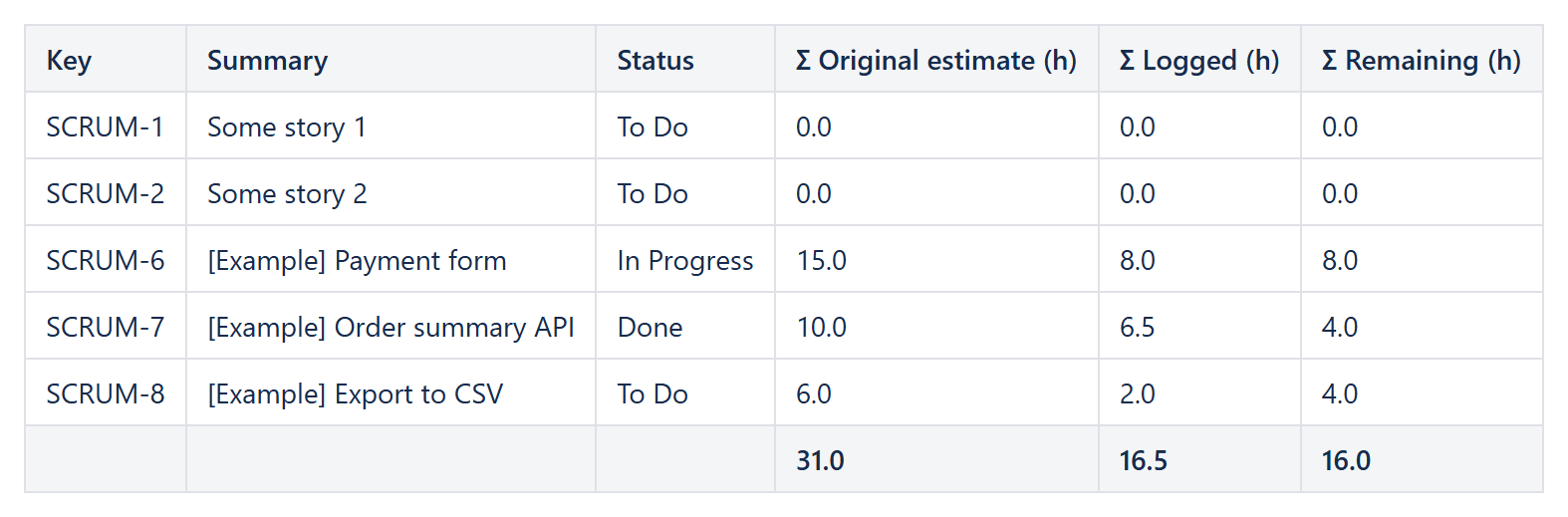
1. The sprint report: one row per issue, totals in the footer
A Reporting Table View with a Reporting Jira Data Provider:
Query:sprint = "Sprint 42" AND issuetype not in subTaskIssueTypes() ORDER BY key– orsprint in closedSprints() AND project = DEVFields:summary,status,aggregatetimeoriginalestimate,aggregatetimespent,aggregatetimeestimate
The aggregate (Σ) fields include the time of an issue's Sub-tasks, so estimates that sit on Sub-tasks are counted once, through their parent; that is why the query leaves the Sub-tasks themselves out. Jira returns the times in seconds and leaves them empty when nothing was estimated or logged, so each column divides by 3600 and treats an empty value as 0. One Reporting Table Item per column:
| Header | Body content | Options |
|---|---|---|
| Key | CurrentItem.key | |
| Summary | CurrentItem.fields.summary | |
| Status | CurrentItem.fields.status.name | |
| Σ Original estimate (h) | IF(ISNUMBER(CurrentItem.fields.aggregatetimeoriginalestimate); CurrentItem.fields.aggregatetimeoriginalestimate / 3600; 0) | Format type: Number, 1 decimal; Footer aggregate: Sum |
| Σ Logged (h) | IF(ISNUMBER(CurrentItem.fields.aggregatetimespent); CurrentItem.fields.aggregatetimespent / 3600; 0) | the same |
| Σ Remaining (h) | IF(ISNUMBER(CurrentItem.fields.aggregatetimeestimate); CurrentItem.fields.aggregatetimeestimate / 3600; 0) | the same |
To mark the issues that went over their estimate, set Highlight when on one column to the logged time being greater than the original estimate, written with the same IF(...) expressions.
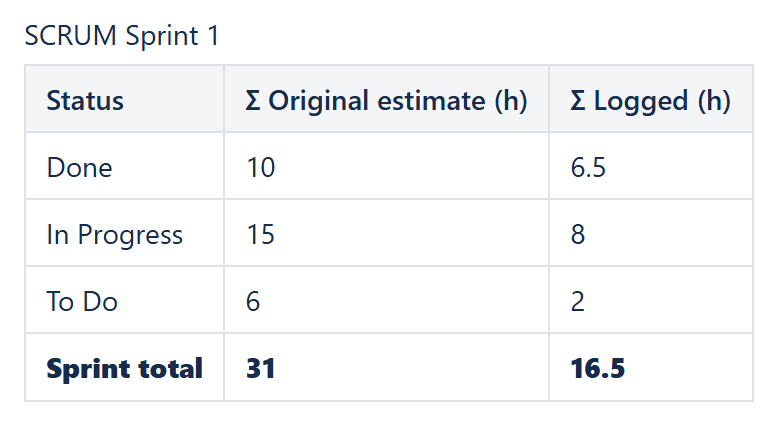
2. Just the totals: Math formulas in a table
When the report should show only the numbers – per status, per team or per sprint – put a Numerical Expression into each cell:
SUM(JIRAISSUEFIELDVALUESBYFIELDID("sprint = 'Sprint 42' AND statusCategory = Done AND issuetype not in subTaskIssueTypes()", "aggregatetimeoriginalestimate", 0)) / 3600
Change the JQL per row and add a total row with SUM(Table1.B2:B4):
The same pattern with story points instead of time is in Summing story points by sprint and component.
Sending it at the end of the sprint
The page is always up to date, so a sprint-end Automation rule no longer has to compute anything: it can send the link to the page, and the numbers are read from Jira when the page is opened.
Variations
- Estimate vs. logged per issue: Original estimate vs. logged time.
- The retired Time Tracking report: Replacing the retired Time Tracking report.
- Per person: sort the table by
fields.assignee.displayName, or use one table per assignee to get a total per person in each footer.
Try it in your own Confluence: CelesteCS Reporting for Confluence and CelesteCS Math for Confluence on the Atlassian Marketplace – free trial for Cloud and Data Center.
Reporting or Math saves you time? A review on the Marketplace – Reporting, Math – helps other teams find them.