Conditional Icon Set macro places one of several icons next to a cell’s value, depending on which tier the value falls into, as defined by a series of thresholds. This macro must be used inside Conditional Rules Manager macro.
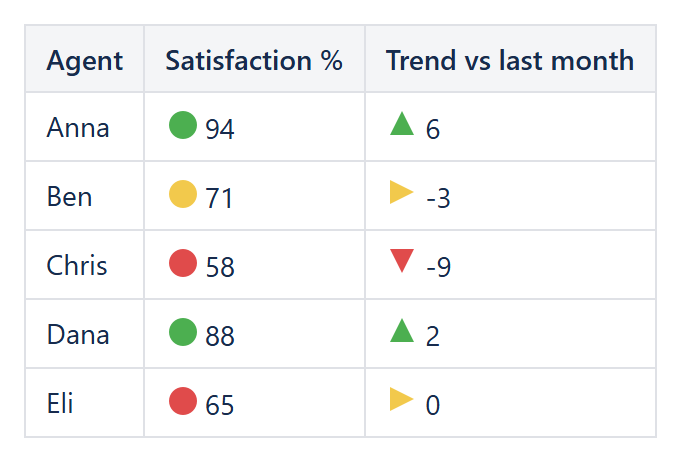
Example: 3 Traffic Lights on satisfaction and 3 Arrows on the monthly trend.
New! – 4- and 5-tier icon set styles (Rating Bars, Pie Gauge, and 4/5-icon Traffic Lights/Arrows), together with the Threshold 3 and Threshold 4 parameters they use.
Conditional Icon Set macro does the following:
- computes as many threshold values as the chosen Icon set style needs (2 for a 3-icon style, 3 for a 4-icon style, 4 for a 5-icon style) for the range, as defined by the Threshold 1–4 type parameters;
- places the lowest icon of the chosen Icon set style next to cells with a value below Threshold 1;
- places each next icon next to cells with a value at or above the previous threshold but below the next one;
- places the highest icon next to cells with a value at or above the last threshold the style uses;
- optionally shows the cell’s original value as text alongside the icon, controlled by Show value.
Every icon is a small self-contained inline SVG drawn from basic shapes (circles, triangles, bars, pie-slice arcs) – no external image files, icon fonts, or emoji are used, so there are no third-party licensing or attribution concerns with any icon set style.
Conditional Icon Set macro has the following parameters:
| Parameter | Description |
|---|---|
| [Enum] Icon set style (default='3 Traffic Lights') | The set of icons to use. May have one of the following values:
|
| [Enum] Threshold 1 type (default='Percent') | The type of the first (lowest) threshold value to be used. Based on this type Threshold 1 value parameter value may have to be specified. May have one of the following values:
|
| [String] Threshold 1 value (default='33') | The value parameter – either a percentile, a constant or a percent value should be specified, based on the Threshold 1 type parameter value. |
| [Enum] Threshold 2 type (default='Percent') | The type of the second threshold value to be used. Based on this type Threshold 2 value parameter value may have to be specified. Has the same set of values as Threshold 1 type:
|
| [String] Threshold 2 value (default='67') | The value parameter – either a percentile, a constant or a percent value should be specified, based on the Threshold 2 type parameter value. |
| [Enum] Threshold 3 type (default='Percent') New! |
Only used by 4- and 5-icon styles. The type of the third threshold value to be used, with the same set of values as Threshold 1 type. |
| [String] Threshold 3 value (default='60') New! |
Only used by 4- and 5-icon styles. The value parameter for Threshold 3, based on the Threshold 3 type parameter value. |
| [Enum] Threshold 4 type (default='Percent') New! |
Only used by 5-icon styles. The type of the fourth (highest) threshold value to be used, with the same set of values as Threshold 1 type. |
| [String] Threshold 4 value (default='80') New! |
Only used by 5-icon styles. The value parameter for Threshold 4, based on the Threshold 4 type parameter value. |
| [Boolean] Reverse icon order (default=false) | Specifies whether to reverse which icon is used for low and high values – the same way Excel’s own “Reverse Icon Order” option works. Supported values are true and false (default). |
| [Boolean] Show value (default=true) | Specifies whether to show the cell’s original numeric value as text alongside the icon. Supported values are true (default) and false. |
| [String] Applies to (default='All tables') | Specifies the cells to apply conditional formatting to.
|
When the parameters are set, an example of the icons applied across the range, from lowest to highest value, may be seen at the preview pane of the macro editor. Press “Preview” button after changing parameters to see the result.