The Jira Cloud Time Tracking report, which listed original estimate, time spent and remaining estimate per issue, is among the legacy reports Atlassian is retiring. CelesteCS Reporting for Confluence rebuilds the same table on a Confluence page from live Jira data, with totals and the over-estimate issues highlighted, and you can add any column the old report never had.
Works on Confluence Cloud and Data Center.
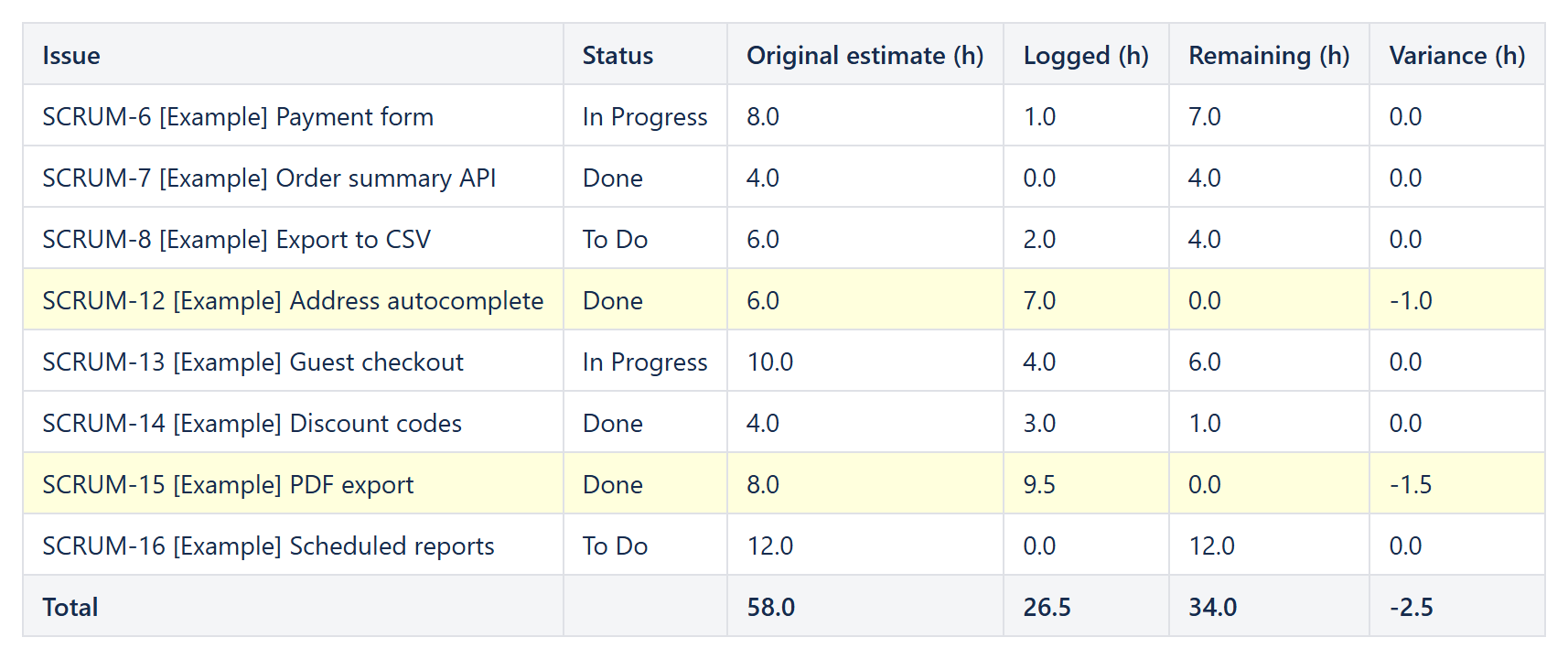
The configuration
A Reporting Table View with a Reporting Jira Data Provider:
Query:project = APP AND fixVersion = "2.0" ORDER BY key(orsprint in openSprints(), an epic, a filter)Fields:summary,status,timeoriginalestimate,timespent,timeestimate
and one Reporting Table Item per column. Jira stores the times in seconds and leaves them empty when not set, so each time column is wrapped like this:
| Column | Body content | Format / footer |
|---|---|---|
| Original estimate (h) | IF(ISNUMBER(CurrentItem.fields.timeoriginalestimate); CurrentItem.fields.timeoriginalestimate / 3600; 0) | Number, 1 decimal, Sum |
| Logged (h) | the same with timespent | Number, 1 decimal, Sum |
| Remaining (h) | the same with timeestimate | Number, 1 decimal, Sum |
| Variance (h) | original − logged − remaining | Number, 1 decimal, Sum |
On the Variance column set Highlight when to (logged + remaining) > original, written with the same IF(...) expressions. Keep the parentheses around the sum: the comparison then applies to the whole sum.
Variations
- Per person: sort the table by
fields.assignee.displayName, or put one table per assignee on the page to get a per-person total in each footer. - Including Sub-tasks: use the aggregate fields
aggregatetimeoriginalestimate,aggregatetimespentandaggregatetimeestimate; see Story estimates including Sub-tasks. - Estimate vs. logged only: Original estimate vs. logged time: a live Confluence report from Jira.
Try it in your own Confluence: CelesteCS Reporting for Confluence on the Atlassian Marketplace – free trial for Cloud and Data Center.
Reporting saves you time? A review on the Marketplace helps other teams find it.