CelesteCS Math plugin lets one add live calculations to Confluence pages: enter a formula and it is evaluated on the server on every page view, so the shown result always reflects the current page data. It contains the following macros:
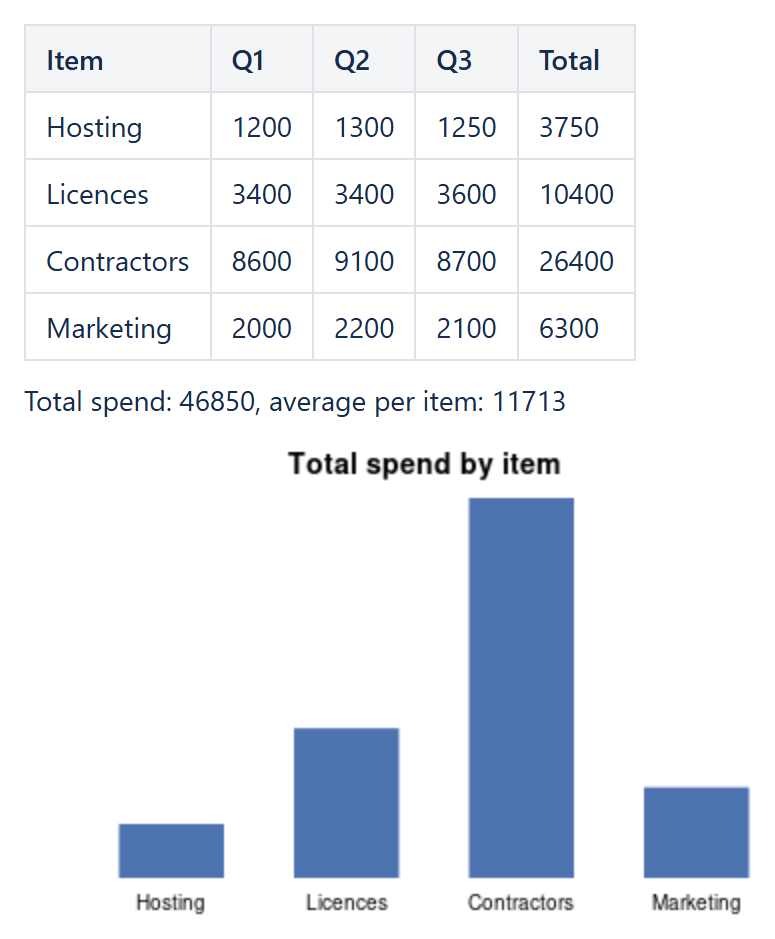
Example: per-row totals, a summary sentence and a chart, all calculated by CelesteCS Math from the table on the page.
- Numerical Expression macro – the main macro; enter a formula in the macro body – a single expression, or several expressions embedded in text and enclosed in square or curly braces. Formula operands can be plain numbers, table cell values and ranges, the rendered output of other Confluence macros, and any of the built-in functions combined with the supported operations – including New! IFERROR and IFNA, which show a value of your choice instead of an error (Data Center since 27.2.0; Cloud since 19 October 2026).
- Chart macro – New! – renders a Bar, Line or Pie chart directly from a range of cells on the page, recalculated fresh on every page view.
The power of Numerical Expression is in the ability to use outside data as formula operands. Table cells are referenced in a simple Excel-like manner, for example 'ROUND(Table1.A2)'; cell ranges are also supported, for example 'SUM(Table1.A2:B10)'. The source table may be located on the current or another wiki page. A Confluence macro may also be specified as an operand – its rendered output is taken as plain text, so use the VALUE function to extract the first numeric value from it. If the formula text is formatted, the same formatting is applied to the output; to format the result explicitly (for example as a currency) use the TEXT function, for example 'TEXT(SUM(Table1.B2:B10), "$0.00")'.
Note for Cloud version: Math Cloud performs user-impersonated calls to Jira Cloud in JIRAISSUECOUNT, JIRAISSUEFIELDVALUES and JIRAISSUEFIELDVALUESBYFIELDID functions. Jira integration is built into CelesteCS Math for Confluence Cloud, so no separate integration plug-in is needed: just make sure the app is also installed on your primary Jira Cloud instance. Specifying non-primary Jira Cloud instances is not supported.
Find out more here:
- Quick Start Guide
- Working with Tables
- Working with Datetime values
- Plugin permissions and "Read own page" error
- Working with Charts
CelesteCS Math is available for both Confluence Data Center and Confluence Cloud. Pages migrated from Data Center to Cloud with the Confluence Cloud Migration Assistant keep working without changes – see Migrating from Data Center to Cloud.
Math for Confluence Data Center supports Confluence 9.2 – 11.
Works well with
CelesteCS Math shares its formula engine with two other CelesteCS apps, so the functions and operations you already use in Math work there too:
- CelesteCS Conditions – conditional formatting for Confluence tables: highlight cells and rows by rules or formulas, add color scales, data bars and icon sets. View on Atlassian Marketplace
- CelesteCS Reporting – build tables and lists from Confluence pages, Page Properties and Jira issues, with calculated columns, totals, filtering and sorting. View on Atlassian Marketplace
Math saves you time? A review on the Marketplace helps other teams find it.