CelesteCS Conditions plugin allows one to apply table cell formatting and text replacement based on specified conditional rules. It contains the following macros:
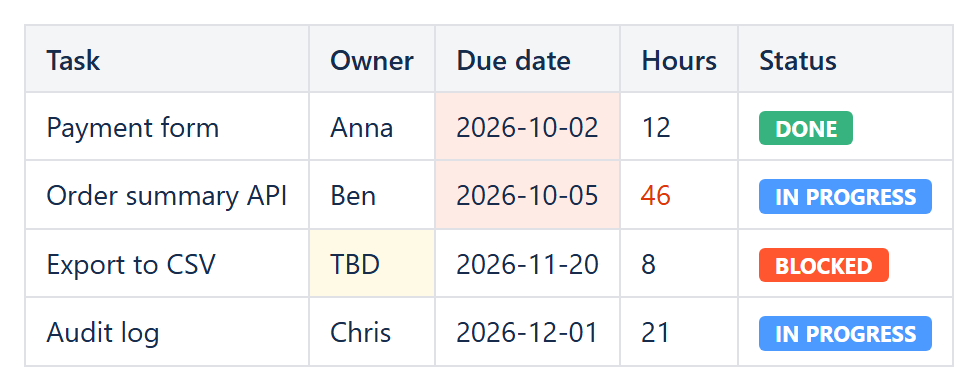
Example: Conditional Rules inside a Conditional Rules Manager color status lozenges, overdue dates and outliers in an ordinary table.
- Conditional Rule macro, which checks the conditions for applying formatting options to conformant elements
- Conditional Rules Manager macro, which applies conditional formatting rules to own contents
Both these macros work in conjunction: Conditional Rules Manager macro should contain at least one Conditional Rule macro and from the other side Conditional Rule macro cannot be specified separately from the Conditional Rules Manager as it is just a container for conditional rules parameters.
In addition to the Conditional Rule macro, the following visual formatting macros are also available (each also used inside Conditional Rules Manager macro):
- Conditional 2-Color Scale macro, which applies a color gradient to a range of cells, from a minimum to a maximum color
- Conditional 3-Color Scale macro – New! – the same, with an additional midpoint color
- Conditional Data Bar macro – New! – draws an in-cell bar proportional to the cell’s value
- Conditional Icon Set macro – New! – places one of 3, 4 or 5 icons (traffic lights, arrows, symbols, rating bars or pie gauges) next to a cell’s value, based on up to four thresholds
The Conditional Rule macro supports 40 conditions: value and text comparisons, blank and numeric checks, above/below average, top/bottom N, duplicate and unique values, formula-based rules, text length, date conditions – before/after a date, today, yesterday, in the next/last N days, overdue and overdue by more than N days (useful for SLA tracking), plus New! text is one of a list, regular expression, date in this week / month / quarter, on a weekend, in the next N working days, and Status macro color.
New! Rules can also hide whole rows (a simple filter), address columns by their header text (e.g. '[Status]') instead of letters, and use ready-made presets such as RAG status or overdue dates. Tables produced by other macros (Reporting, Page Properties Report, Task Report) can be formatted too - see Conditional Rules Manager macro.
CelesteCS Conditions is available for both Confluence Data Center and Confluence Cloud, with the same macros, conditions and parameters. Pages migrated from Data Center to Cloud with the Confluence Cloud Migration Assistant keep working without changes – see Migrating from Data Center to Cloud.
Find out more here:
Conditions for Confluence Data Center supports Confluence 9.2 – 11.
Conditions saves you time? A review on the Marketplace helps other teams find it.