"Sum all story points of sprint 1234 for component FE" is a question JQL cannot answer: a JQL query returns issues, never a total. Jira dashboards can show a sum for a single filter, but a table with one total per component, per team or per sprint needs a separate filter and gadget for every cell. With CelesteCS Math for Confluence each cell of an ordinary Confluence table becomes such a total, read live from Jira.
Works on Confluence Cloud and Data Center. On Cloud insert CelesteCS Numerical Expression Cloud; the formulas are the same.
1. The formula
Put a Numerical Expression macro into a table cell:
SUM(JIRAISSUEFIELDVALUESBYFIELDID("sprint = 1234 AND component = FE", "customfield_10016", 0))
JIRAISSUEFIELDVALUESBYFIELDID reads the field from every issue that matches the JQL query, and SUM adds the values up. The last argument, 0, is used for issues where the field is empty.
customfield_10016 is the Story point estimate field on many Jira Cloud sites; on your site it may have another ID (Data Center often uses customfield_10002). Determining the field ID by its name shows how to find it. Alternatively, JIRAISSUEFIELDVALUES takes the field name as you see it in Jira, for example "Story point estimate".
2. A table of totals
Repeat the formula with a different component (or team, label, sprint) in each row, and add a total row with a normal table formula:
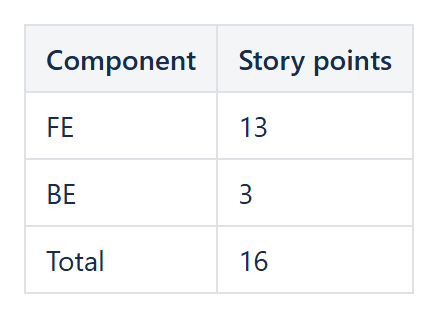
| Component | Formula | Result in our test sprint |
|---|---|---|
| FE | SUM(JIRAISSUEFIELDVALUESBYFIELDID("sprint = 'Sprint 1' AND component = FE", "customfield_10016", 0)) | 13 |
| BE | SUM(JIRAISSUEFIELDVALUESBYFIELDID("sprint = 'Sprint 1' AND component = BE", "customfield_10016", 0)) | 3 |
| Total | SUM(Table1.B2:B3) | 16 |
The same pattern works for a matrix: components in rows, sprints in columns, one formula per cell. Use sprint in openSprints() for the current sprint, so the page never needs editing.
Other aggregates
AVERAGE(...),MAX(...)andMIN(...)work on the same list of values.JIRAISSUECOUNT("sprint = 1234 AND component = FE")counts the issues.- A CelesteCS Chart macro over the table turns the totals into a bar chart.
Every value is read when the page is opened, so the totals always match Jira, with no export to Excel or pivot table. More examples: Performing calculations over Jira issue fields.
Try it in your own Confluence: CelesteCS Math for Confluence on the Atlassian Marketplace – free trial for Cloud and Data Center.
Math saves you time? A review on the Marketplace helps other teams find it.