Numerical Expression is CelesteCS Math's main macro. It lets you enter a formula on a Confluence page; the formula is evaluated on the server on every page view, so the shown result always reflects the current page data – no manual recalculation is needed. The formula can be the whole macro body, or one or more formulas embedded in ordinary text and enclosed in square or curly braces (see the Macro body content parameter below).
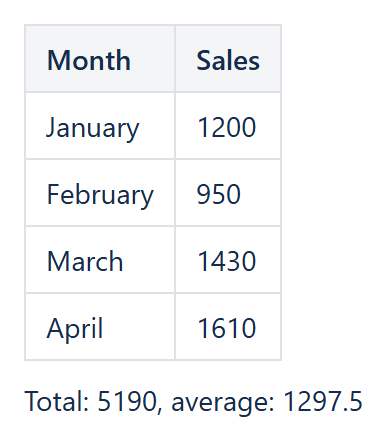
Example: a Numerical Expression below the table shows the total and the average of the Sales column.
Formula operands can be plain numbers, table cell values and ranges (referenced in an Excel-like way, for example 'SUM(Table1.A2:B10)', on the current or another wiki page), the rendered output of other Confluence macros, and any of the built-in functions combined with the supported operations. Both usual math notation ('a + max(b, c)') and Excel notation ('a + MAX(b; c)') are accepted. If the formula text is formatted, the same formatting is applied to the output; to format the result explicitly (for example as a currency) use the FORMAT function.
Numerical Expression macro has the following parameters:
| Parameter | Description |
|---|---|
| [Enum] Macro body content (default='Single expression') | Defines how formulas are written in the macro body. May have one of the following values:
|
| [Enum] Outer values source (default='Macro body') | Where table cell values referenced by the formula are read from. May have one of the following values:
|
| [String] Other Confluence page (default=empty) | The wiki page whose tables are used as the source of cell values. Applies only when Outer values source is set to 'Other page'. You must have permission to view the selected page. |
| [Boolean] Show calculation result only (default='True') | When on, only the calculated result is shown. When off, both the formula and its result are shown. If a macro is used as an operand, the numeric value taken from it is what is shown. |
| [Boolean] Load macro dynamically (default='False') | If turned on, only a small placeholder is loaded with the page and the formula result is loaded right afterwards, so the page does not wait for every calculation. Confluence 10.x Supported since Math 26.2.0 (Data Center). Confluence 9.x Since Math 26.2.0 the option is ignored and the formula is calculated when the page is displayed (earlier versions showed an error message instead of the result). Not applicable to Cloud. |
| [Enum] Decimal symbol (default='.(dot)') | The symbol used to separate the integer part from the fractional part of the result. Supported values are '.(dot)' (default) and ',(comma)'. |
| [Enum] Digit grouping symbol (default='(no grouping symbol)') | The symbol used to separate groups of digits in the integer part of the result. Supported values are '(no grouping symbol)' (default), ' (space)', '.(dot)', ',(comma)' and "'(apostrophe)". |
See also: How to start · Adding macro to a page · Adding table values as operands · Adding other macros as operands · Operations · Functions. The other macro of the plug-in is the Chart macro.