Reporting List View macro is a container for other Reporting macros. It is used to gather all the macros, used to form the list report. It should contain one Data Provider macro (Reporting Jira Data Provider macro or Reporting Confluence Data Provider macro) and one Reporting List Item macro. Data providers read data from appropriate sources and form it as JSON data. Reporting List Item macros take appropriate fields from data providers and use them as values of the list items.
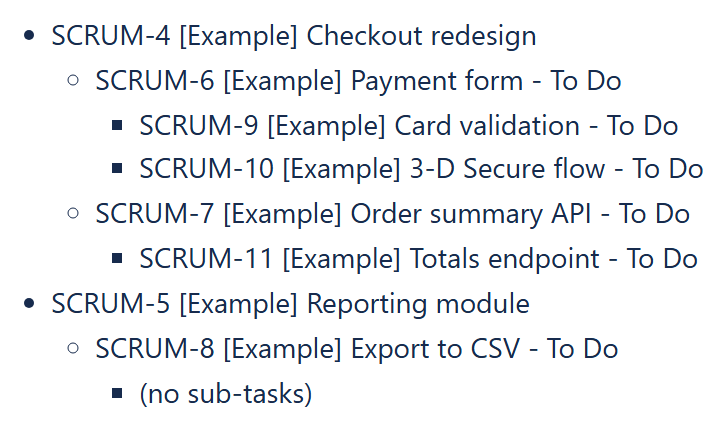
Example: a three-level List View - Epics, their Stories and the Sub-tasks of each Story.
Reporting List View macro has the following parameters:
| Parameter | Description |
|---|---|
| [Enum] Decimal symbol (default='.(dot)') | Specifies symbol used to separate the integer part from the fractional part of a value. Supported values are ".(dot)" (default) and ",(comma)". |
| [Enum] Digit grouping symbol (default='(no grouping symbol)') | A symbol used to separate the groups of digits of a value. Supported values are "(no grouping symbol)" (default), " (space)", ".(dot)", ",(comma)" and "'(apostrophe)". |
| [String] Empty response text content (default='No data.') | This text value will be shown when zero items were returned on the specified request. (Technical) In case of Jira and Confluence data providers this text is shown when search requests returned code 400. |
| [Enum] Empty response text output type (default='Plain text') | The way how the Empty response text will be pre-processed before writing to the page. May have one of the following values:
|
| [Boolean] Load macro dynamically (default='False') | If turned on, only a small placeholder is loaded with the page and the report is loaded right afterwards, so the page does not wait for the report. Confluence 10.x Supported since Reporting 12.1.0 (Data Center). Confluence 9.x Since Reporting 12.1.0 the option is ignored and the report is rendered when the page is displayed (earlier versions showed an error message instead of the report). Not applicable to Cloud. |
More examples
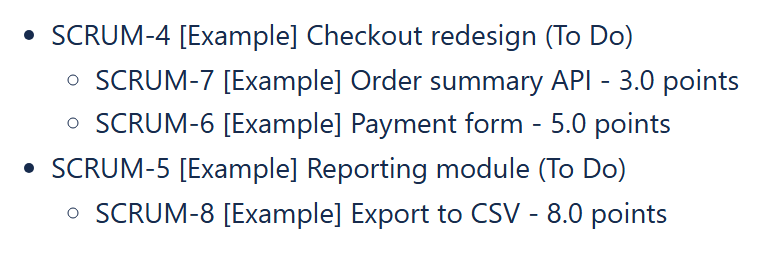
Example: two levels - Epics, then a Jira Data Provider with the formula query "parent = " & CurrentParentItem.key for their Stories.
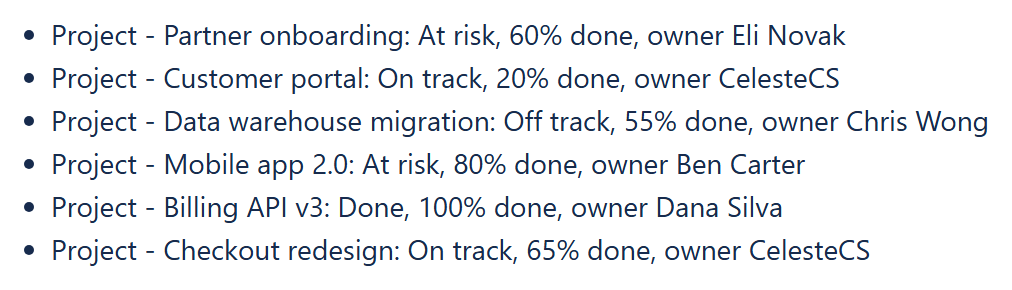
Example: a one-level List View over the Page Properties Data Provider - one line per project page.