Reporting Page Properties Data Provider macro reads the Page Properties of Confluence pages – the same key / value tables that Confluence's own Page Properties Report shows – and turns them into report lines: one line per page, with the keys of its Page Properties table as fields. Unlike the native Page Properties Report, the result can be used in Reporting formulas: calculated columns, totals in the footer, sorting by any column, filtering and row highlighting. Like other data providers it is placed inside a Reporting Table View or Reporting List View macro.
New! Since Reporting 14.0.0 (Data Center); Reporting for Confluence Cloud gets it in its next release.
How pages are selected
Pages are selected the same way as in the Page Properties Report: by Labels and Spaces (the current space when Spaces is empty). Instead of them any CQL query may be specified in Query, for example type = page and ancestor = 12345 and label = "project". Only pages that contain a Page Properties macro (with the specified Page Properties ID, if it is set) are listed. Hidden Page Properties tables are read as well. The search runs on behalf of the current user, so a report only contains pages this user may see.
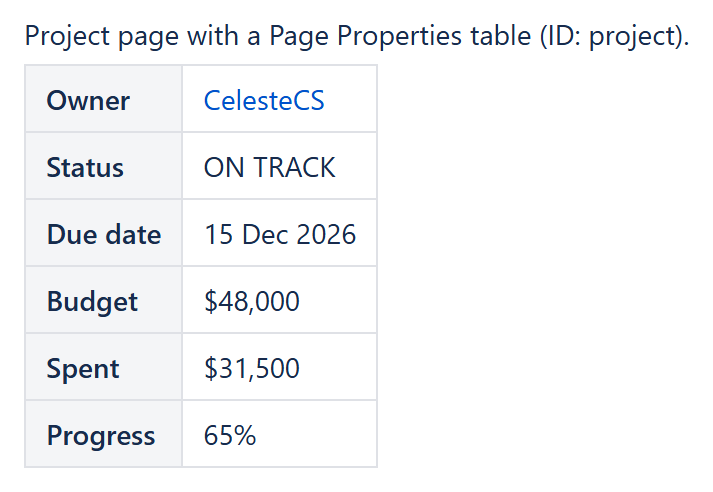
A project page with a Page Properties table (ID project) - the source of one report line.
What every report line contains
CurrentItem.id, CurrentItem.title, CurrentItem.url | Page ID, title and a link to the page |
CurrentItem.space.key, CurrentItem.space.name | Space key and name |
CurrentItem.labels | Page labels |
CurrentItem.lastUpdated | Date and time of the last change |
CurrentItem.properties.<key> | The value of a Page Properties key, as it is shown on the page: users by name, status lozenges by their title, dates as yyyy-MM-dd, page links by the page title |
CurrentItem.propertyNames | The original key names (see below) |
Key names in formulas. In a formula a key may only contain latin letters, digits and '_'. Other characters are replaced: Due date becomes CurrentItem.properties.Due_date, Budget ($) becomes CurrentItem.properties.Budget. A key without such characters (for example in another alphabet) is available as property_1, property_2, … by its position; CurrentItem.propertyNames shows which name belongs to which key.
Parameters
| Parameter | Description |
|---|---|
[String] Labels (default='') | Comma-separated page labels, as in the Page Properties Report, e.g. 'project, active'. Pages with any of the labels are listed. Ignored when Query is set. |
[String] Spaces (default='') | Comma-separated space keys. Empty means the current space, '@all' means all spaces. Ignored when Query is set. |
[String] Query (default='') | An optional CQL query used instead of Labels and Spaces. May contain ${page.title}, ${page.id}, ${space.key} and ${today} (yyyy-MM-dd), which are replaced with the current page's values, so the same report works on every page created from a template. |
[String] Page Properties ID (default='') | Read only the Page Properties macros with this ID (the ID field of the Page Properties macro), for pages with several Page Properties tables. Empty – all of them; when a key appears in several tables, the first value wins. |
[String] Property keys (default='') | Comma-separated keys to read, e.g. 'Owner, Status, Budget'. Keys are matched ignoring case. Empty – all keys of every page. |
[Enum] Value format (default='Text') | Text – values as they are shown on the page. Typed – numbers such as '1,250', '$300' or '45%%' (= 0.45) become numbers, so totals, numeric formats and numeric sorting work without extra formulas. |
[String] Filter (default='') | The formula, which filters out the lines when it returns False, e.g. CurrentItem.properties.Status <> "Done". Ignored if empty. A comparison that cannot be evaluated – a number against text, or an empty field – counts as False (since Reporting 14.1.0). |
[Long] Max results (default=1000) | The maximum number of report lines, i.e. pages with a matching Page Properties table, up to 1000. Pages without such a table do not count, as in the native Page Properties Report; at most 1000 pages are searched (since Reporting 14.1.0). |
Example
A project report over all pages labelled project in the PMO space, with the Page Properties macro ID project:
- Reporting Page Properties Data Provider: Labels =
project, Spaces =PMO, Page Properties ID =project, Property keys =Owner, Status, Due date, Budget, Spent, Progress, Value format = Typed - Reporting Table View: Sort =
properties.Due_date:date - Reporting Table Item columns:
CurrentItem.title;CurrentItem.properties.Owner;CurrentItem.properties.Due_date(Format type: Date);CurrentItem.properties.BudgetandCurrentItem.properties.Spent(Format type: Currency, Footer aggregate: Sum);CurrentItem.properties.Budget - CurrentItem.properties.Spent(Currency, Sum, Highlight whenCurrentItem.properties.Spent > CurrentItem.properties.Budget);CurrentItem.properties.Progress(Percent, Footer aggregate: Average)
The result is a project list sorted by due date, with the remaining budget calculated per project, totals in the footer and the projects over budget highlighted – things the native Page Properties Report cannot do.
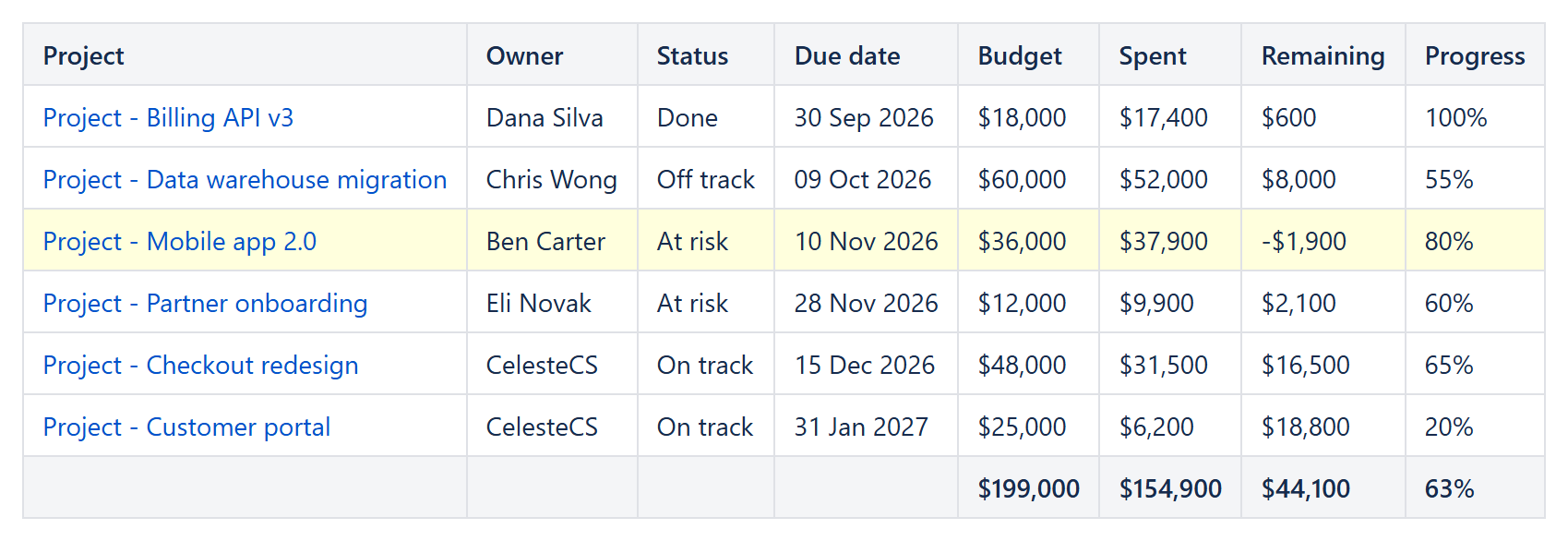
The result of the example above: budget totals in the footer, the remaining budget calculated per project and the over-budget project highlighted.
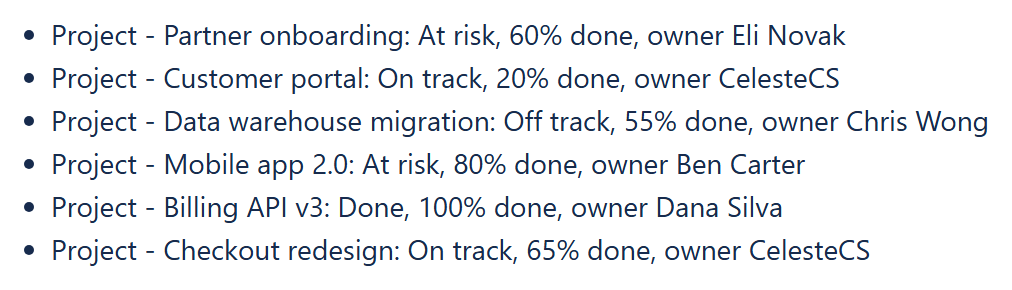
The same pages in a Reporting List View: List Item body [CurrentItem.title]: [CurrentItem.properties.Status], [CurrentItem.properties.Progress] done, owner [CurrentItem.properties.Owner].
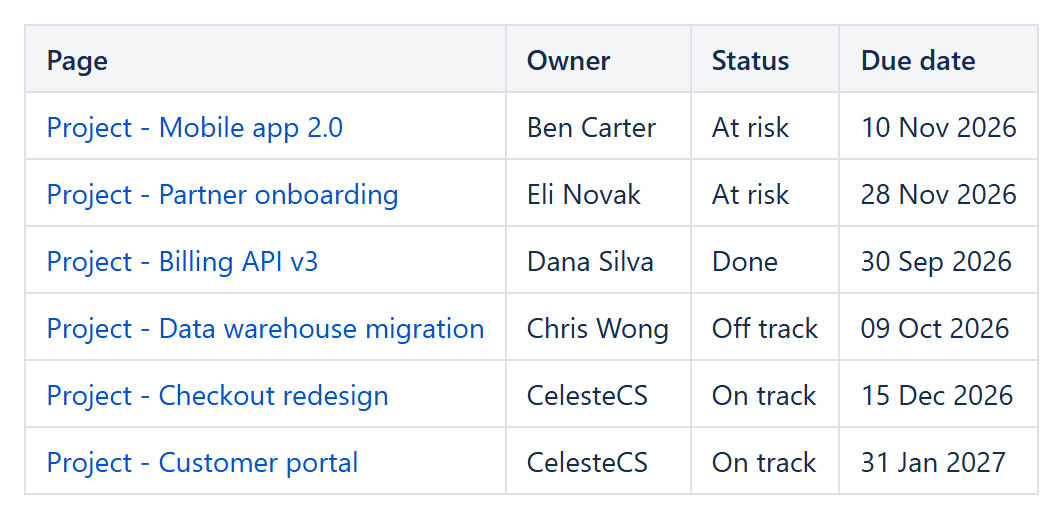
Without labels: Labels and Spaces empty (the current space), Filter LEFT(CurrentItem.title; 7) = "Project", Table View Sort properties.Status,title.