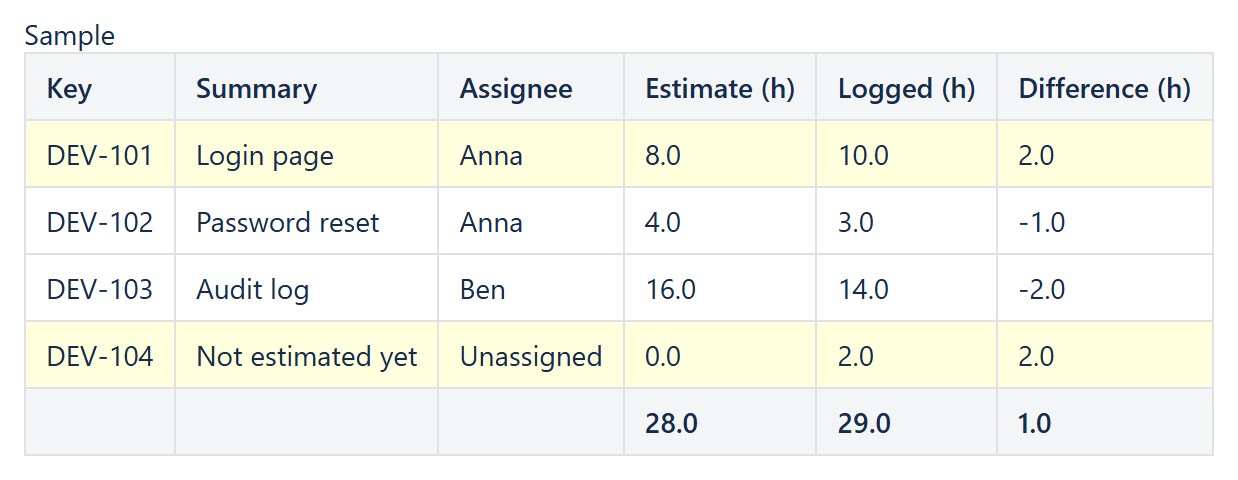
"How close were our estimates?" is one of the most common retrospective questions, and Jira's own reports only partly answer it: the sprint report lists the original estimate but not the logged time, and gadgets show totals rather than a per-issue comparison. With CelesteCS Reporting for Confluence one table on a Confluence page lists every issue of a sprint (or a project, or a person) with its original estimate, the time logged against it and the difference, with totals underneath, and it refreshes every time the page is viewed.
Works on Confluence Cloud and Data Center. On Cloud the macros are called CelesteCS Reporting ... Cloud in the macro browser; the configuration below is the same.
1. The data: a Reporting Jira Data Provider
Insert a Reporting Table View macro and put a Reporting Jira Data Provider inside it:
- Query: the issues you want to compare, for example
sprint = 123,sprint in closedSprints() AND project = DEVorproject = DEV AND worklogDate >= startOfMonth() - Fields:
summary,assignee,timeoriginalestimate,timespent
Jira returns both time fields in seconds, and leaves them empty when nothing has been estimated or logged yet, so the column formulas below divide by 3600 and treat an empty value as zero.
2. The columns: Reporting Table Item macros
Add one Reporting Table Item per column (Body content type: Single expression):
| Header | Body content | Options |
|---|---|---|
| Key | CurrentItem.key | |
| Summary | CurrentItem.fields.summary | |
| Assignee | IF(ISBLANK(CurrentItem.fields.assignee); "Unassigned"; CurrentItem.fields.assignee.displayName) | |
| Estimate (h) | IF(ISNUMBER(CurrentItem.fields.timeoriginalestimate); CurrentItem.fields.timeoriginalestimate / 3600; 0) | Format type: Number, Format decimals: 1, Footer aggregate: Sum |
| Logged (h) | IF(ISNUMBER(CurrentItem.fields.timespent); CurrentItem.fields.timespent / 3600; 0) | Format type: Number, Format decimals: 1, Footer aggregate: Sum |
| Difference (h) | IF(ISNUMBER(CurrentItem.fields.timespent); CurrentItem.fields.timespent / 3600; 0) - IF(ISNUMBER(CurrentItem.fields.timeoriginalestimate); CurrentItem.fields.timeoriginalestimate / 3600; 0) | Format type: Number, Format decimals: 1, Footer aggregate: Sum, Highlight when: IF(ISNUMBER(CurrentItem.fields.timespent); CurrentItem.fields.timespent; 0) > IF(ISNUMBER(CurrentItem.fields.timeoriginalestimate); CurrentItem.fields.timeoriginalestimate; 0) |
Set Sort on the Table View to fields.assignee.displayName,key to list the issues person by person. Highlighted rows show at a glance where more time was logged than estimated.
What it looks like
| Key | Summary | Assignee | Estimate (h) | Logged (h) | Difference (h) |
|---|---|---|---|---|---|
| DEV-101 | Login page | Anna | 8.0 | 10.0 | 2.0 |
| DEV-102 | Password reset | Anna | 4.0 | 3.0 | -1.0 |
| DEV-103 | Audit log | Ben | 16.0 | 14.0 | -2.0 |
| DEV-104 | Not estimated yet | Unassigned | 0.0 | 2.0 | 2.0 |
| 28.0 | 29.0 | 1.0 |
Variations
- Per sprint: put the report on the sprint's retrospective page with
sprint = 123, or usesprint = "${page.title}"in a page template. - Per person or per project: change the query, e.g.
assignee = currentUser() AND worklogDate >= startOfMonth(). One report per person on the same page gives per-person totals in each footer. - Tempo users: Tempo writes worklogs to Jira, so the logged time in
timespentincludes them. - Remaining estimate: add a column with
CurrentItem.fields.timeestimate / 3600(the field istimeestimate).
Tip: the same Highlight when idea works for any condition, for example CurrentItem.fields.timespent > CurrentItem.fields.timeestimate to find issues whose logged time already exceeds the remaining estimate.
Try it in your own Confluence: CelesteCS Reporting for Confluence on the Atlassian Marketplace – free trial for Cloud and Data Center.
Reporting saves you time? A review on the Marketplace helps other teams find it.