Conditional 3-Color Scale macro applies a two-step color gradient to the specified range of cells, using a minimum, a midpoint and a maximum color. This macro must be used inside Conditional Rules Manager macro.
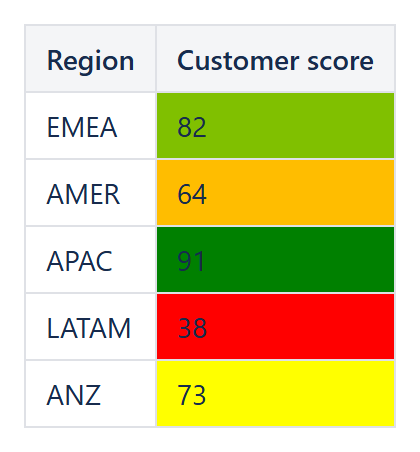
Example: a 3-color scale on customer scores - red for the lowest, yellow around the middle, green for the highest.
New!
Conditional 3-Color Scale macro does the following:
- sets Minimum value color for the cells, which values are lower than the ones, defined by the Minimum value type and Minimum value parameters;
- sets Midpoint value color for the cells, which values are equal to the ones, defined by the Midpoint value type and Midpoint value parameters;
- sets Maximum value color for the cells, which values are higher than the ones, defined by the Maximum value type and Maximum value parameters;
- sets the gradient colors for the values between minimum and midpoint, and between midpoint and maximum, accordingly.
Conditional 3-Color Scale macro has the following parameters:
| Parameter | Description |
|---|---|
| [Enum] Minimum value type (default='Lowest value') | The type of the minimum value to be used. Based on this type Minimum value parameter value may have to be specified. May have one of the following values:
|
| [String] Minimum value (default=empty) | The value parameter – either constant or percent value should be specified, based on the Minimum value type parameter value. |
| [String] Minimum value color (default='red') | The color to be used for the values below the Minimum value and as the starting color for the gradient. Standard CSS color names, Confluence highlight color names and colors in HEX notation (#rrggbb) are supported. |
| [Enum] Midpoint value type (default='Percentile') | The type of the midpoint value to be used. Based on this type Midpoint value parameter value may have to be specified. May have one of the following values:
|
| [String] Midpoint value (default='50') | The value parameter – either a percentile, a constant or a percent value should be specified, based on the Midpoint value type parameter value. |
| [String] Midpoint value color (default='yellow') | The color to be used for the values at the Midpoint value and as the middle color for the gradient. Standard CSS color names, Confluence highlight color names and colors in HEX notation (#rrggbb) are supported. |
| [Enum] Maximum value type (default='Highest value') | The type of the maximum value to be used. Based on this type Maximum value parameter value may have to be specified. May have one of the following values:
|
| [String] Maximum value (default=empty) | The value parameter – either constant or percent value should be specified, based on the Maximum value type parameter value. |
| [String] Maximum value color (default='green') | The color to be used for the values above the Maximum value and as the ending color for the gradient. Standard CSS color names, Confluence highlight color names and colors in HEX notation (#rrggbb) are supported. |
| [String] Applies to (default='All tables') | Specifies the cells to apply conditional formatting to.
|
When the parameters are set, an example of the gradient from Minimum value color through Midpoint value color up to the Maximum value color may be seen at the preview pane of the macro editor. Press “Preview” button after changing parameters to see the gradient.