"Which sprints was this epic part of?" sounds like a simple question, but in Jira an epic is never in a sprint itself – only its stories are. So the answer is the sprints of its stories, and Jira has no native view that lists them per epic. The Sprint field of a story, however, keeps every sprint the story was in, not just the current one. A Reporting Table View from CelesteCS Reporting for Confluence can read that field and show the whole history on a Confluence page.
Checked on Confluence Cloud with Jira Cloud.
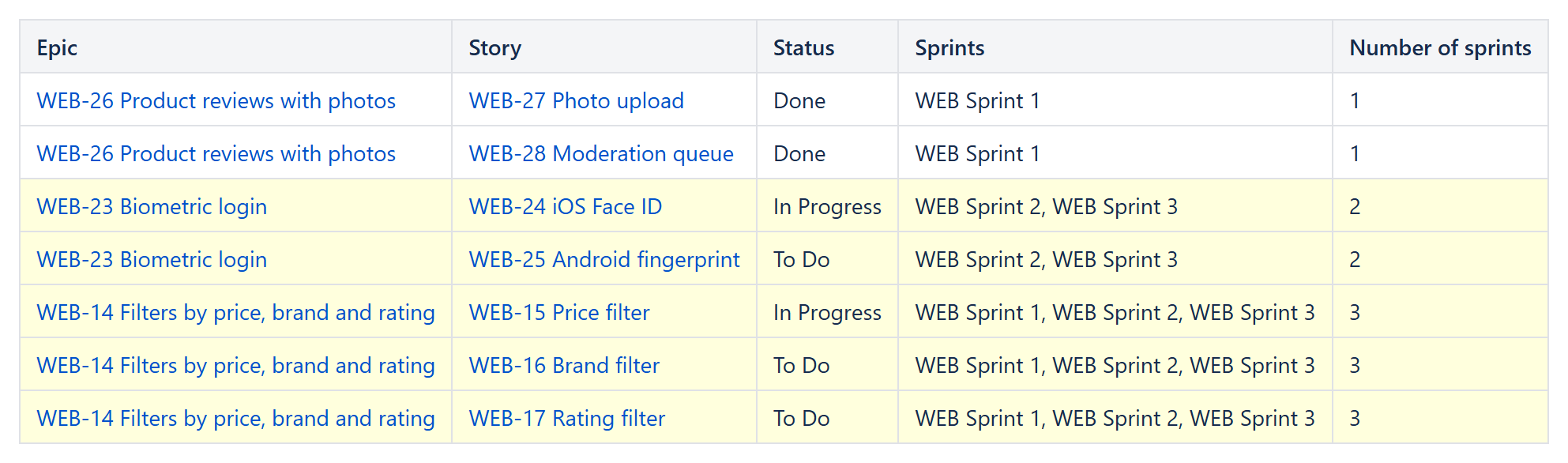
1. The stories of your epics
Insert a Reporting Table View with a Reporting Jira Data Provider inside it:
- Query:
parent in (WEB-14, WEB-23, WEB-26) AND sprint is not EMPTY ORDER BY parent, key– orproject = WEB AND issuetype = Story AND sprint is not EMPTY ORDER BY parent, keyfor all epics of a project. - Fields:
summary,status,parent,customfield_10020.
customfield_10020 is the Sprint field on most Jira Cloud sites. If yours differs, open https://YOUR-SITE.atlassian.net/rest/api/3/field and look for the field named "Sprint".
2. The columns
| Header | Body content | Options |
|---|---|---|
| Epic | CurrentItem.fields.parent.key & " " & CurrentItem.fields.parent.fields.summary | |
| Story | CurrentItem.key & " " & CurrentItem.fields.summary | |
| Status | CurrentItem.fields.status.name | |
| Sprints | CurrentItem.fields.customfield_10020[1].name & IF(JSONARRAYLENGTH(CurrentItem.fields.customfield_10020) >= 2; ", " & CurrentItem.fields.customfield_10020[2].name; "") & IF(JSONARRAYLENGTH(CurrentItem.fields.customfield_10020) >= 3; ", " & CurrentItem.fields.customfield_10020[3].name; "") & IF(JSONARRAYLENGTH(CurrentItem.fields.customfield_10020) >= 4; ", " & CurrentItem.fields.customfield_10020[4].name; "") | Highlight when: JSONARRAYLENGTH(CurrentItem.fields.customfield_10020) >= 2 |
| Number of sprints | JSONARRAYLENGTH(CurrentItem.fields.customfield_10020) | Format type: Number |
The Sprints formula lists up to four sprints; add another IF(...) part for stories that went through more. The highlight marks the stories that were carried over at least once – usually the ones worth a look in the retrospective.
3. Progress per sprint
To see what an epic delivered in one sprint, use the same report with the query parent = WEB-14 AND sprint = "WEB Sprint 2". Or turn on filters for readers in the Table View: readers then type a sprint name into the search box and see only the stories of that sprint.
Related: how many sprints each issue was carried over and a multi-level Jira issue tree.
Try it in your own Confluence: CelesteCS Reporting for Confluence on the Atlassian Marketplace – free trial for Cloud and Data Center.
Reporting saves you time? A review on the Marketplace – Reporting – helps other teams find it.