A flat table is not always the right shape for Jira data – Epics with their Stories underneath, or Stories with their Sub-tasks, read far better as a tree than as one long list with a repeated Epic name in every row. Reporting List View builds exactly that, with one data provider and one Reporting List Item macro per level.
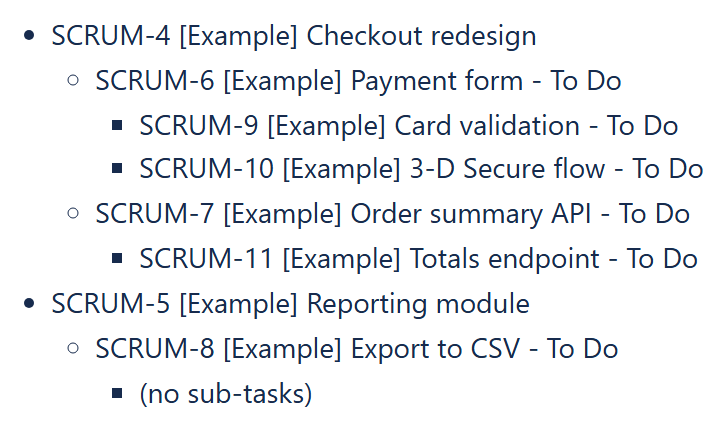
Two levels: Epics and their Stories
Inside a Reporting List View macro:
- First Reporting Jira Data Provider:
Query: project = APP and issuetype = Epic - First Reporting List Item:
Body content:CurrentItem.fields.summary - Second Reporting Jira Data Provider:
Query content type:Single expression,Query:"parent = " & CurrentParentItem.key - Second Reporting List Item:
Body content:CurrentItem.fields.summary
Setting Query content type to Single expression makes the query a formula: the text in quotes is joined with & to the key of the Epic at the level above (CurrentParentItem.key). The formula is recalculated for every Epic in turn, so each Epic gets its own correctly-scoped set of Stories underneath it – there is no need to know the Epic keys in advance. With the default Text only the words CurrentParentItem.key would be sent to Jira literally and the level would stay empty.
On Jira Data Center versions where Stories are attached with the Epic Link field, use "'Epic Link' = " & CurrentParentItem.key instead (single quotes around the field name inside the formula).
Skipping empty branches
Skip items with no children hides the items of its own level that have nothing underneath them. Set it to true on the Epics-level List Item to leave out Epics without Stories, or on the Stories-level List Item to leave out Stories without Sub-tasks in a three-level tree. Without it, an empty branch shows the No data. text of the List View.
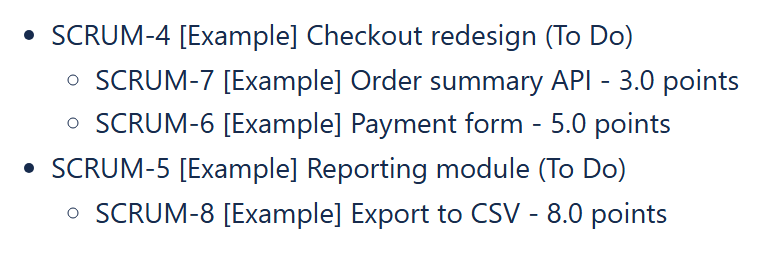
Example: Epics and their Stories with story points; the Stories level uses the formula query "parent = " & CurrentParentItem.key.
Three levels: adding Sub-tasks
The same pattern extends one level further: a third data provider, again with Query content type Single expression and the query "parent = " & CurrentParentItem.key (now referencing the Story level), with a third List Item, giving a full Epic → Story → Sub-task tree. CurrentGrandParentItem is also available at the third level if a Sub-task’s line needs to reference the top-level Epic directly, for example [CurrentItem.key] [CurrentItem.fields.summary] (Epic [CurrentGrandParentItem.key]) with Body content type Text and expressions in square braces.
The same formula technique lists any related issues under each item – for example the issues linked to each Epic with "issue in linkedIssues(" & CurrentParentItem.key & ")", see Listing each Epic’s linked issues on a Confluence page.
This is a good deal more structure than a single flat report, and it is exactly the shape most stakeholders actually picture when they ask for “the Epics with their Stories”, rather than one long table they have to mentally regroup themselves.
Updated 13 October 2026: the queries of the lower levels are now shown as formulas (Query content type: Single expression), and the Skip items with no children option is described for the correct level. Works on Confluence Cloud and Data Center.
Try it in your own Confluence: CelesteCS Reporting for Confluence on the Atlassian Marketplace – free trial for Cloud and Data Center.
Reporting saves you time? A review on the Marketplace helps other teams find it.