Jira's Sprint Report shows what was not completed in one sprint, but not how many times each issue has been carried over, which issues keep rolling from sprint to sprint, or the carry-over rate across sprints. The data is already there: the Sprint field of an issue keeps every sprint the issue has been in, closed ones included. CelesteCS Reporting for Confluence turns that into a per-issue count, and CelesteCS Math for Confluence gives the rate per sprint – on a Confluence page, live from Jira, without Automation rules or extra custom fields, and for past sprints too.
Works on Confluence Cloud and Data Center (on Data Center, through the application link to Jira).
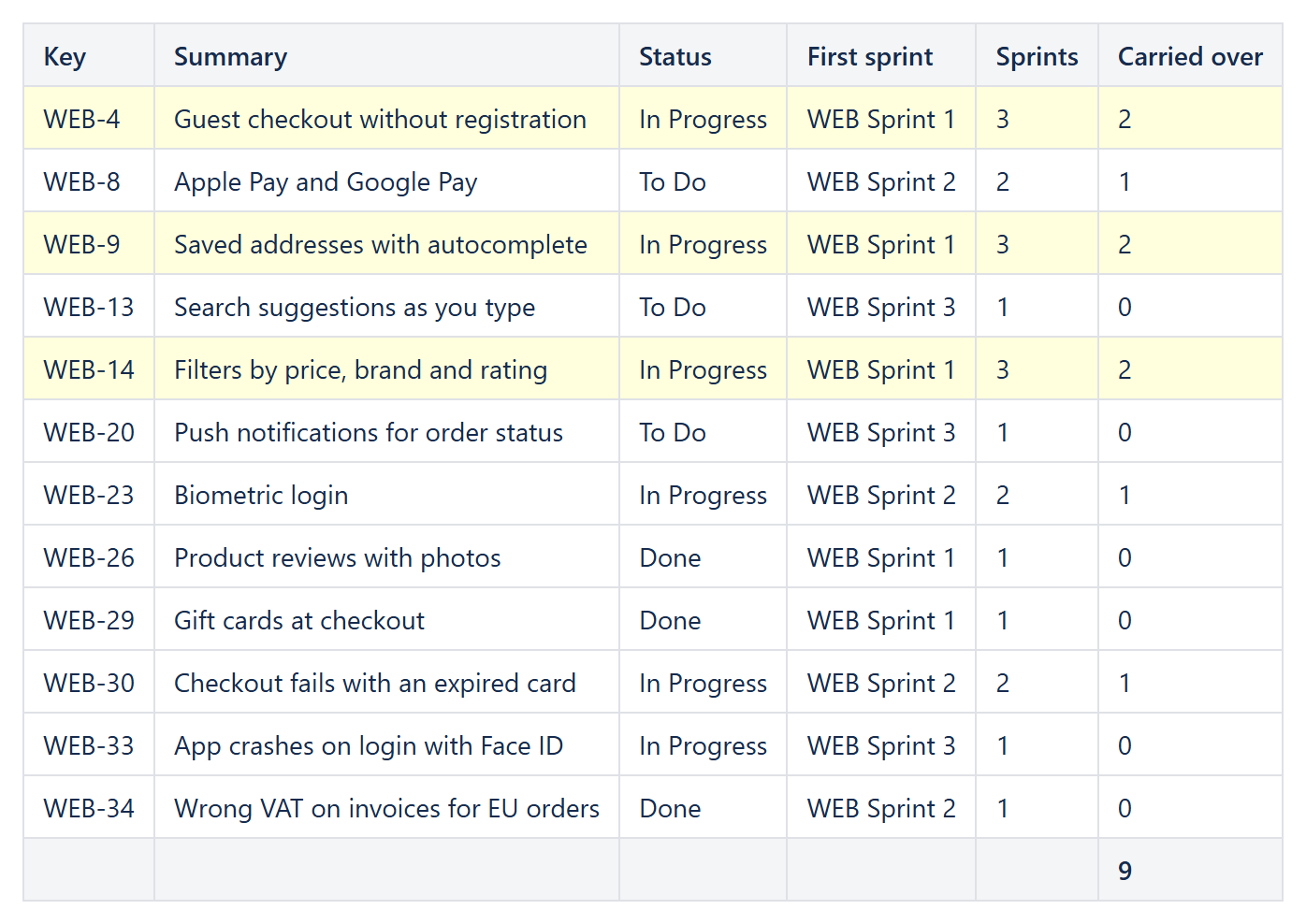
1. Carry-overs per issue
A Reporting Table View with a Reporting Jira Data Provider:
Query:project = WEB AND sprint is not EMPTY AND issuetype not in subTaskIssueTypes() ORDER BY key(orboard-based JQL, e.g.sprint in openSprints() OR sprint in closedSprints()and a project)Fields:summary,status,customfield_10020–customfield_10020is the Sprint field on most Jira Cloud sites; on Data Center find its id with Determining the field ID by its name.
The Sprint field is a list, so JSONARRAYLENGTH counts the sprints and [1] picks the first one. One Reporting Table Item per column:
| Header | Body content | Options |
|---|---|---|
| Key | CurrentItem.key | |
| Summary | CurrentItem.fields.summary | |
| Status | CurrentItem.fields.status.name | |
| First sprint | CurrentItem.fields.customfield_10020[1].name | |
| Sprints | JSONARRAYLENGTH(CurrentItem.fields.customfield_10020) | Format type: Number, 0 decimals |
| Carried over | MAX(JSONARRAYLENGTH(CurrentItem.fields.customfield_10020) - 1; 0) | Footer aggregate: Sum; Highlight when: JSONARRAYLENGTH(CurrentItem.fields.customfield_10020) >= 3 |
An issue that was in three sprints was carried over twice. The highlight marks the issues that rolled over more than once; the footer gives the total number of carry-overs. Add Filter when JSONARRAYLENGTH(CurrentItem.fields.customfield_10020) >= 2 to list only the issues that were carried over at all.
2. Carry-over rate per sprint
An issue was carried over from Sprint A to Sprint B when both are in its Sprint field, and JQL can ask exactly that: sprint = "A" AND sprint = "B". In a Confluence table with a Numerical Expression in each cell:
Issues in sprint:      JIRAISSUECOUNT("project = WEB AND issuetype not in subTaskIssueTypes() AND sprint = 'WEB Sprint 1'")
Carried over:          JIRAISSUECOUNT("project = WEB AND issuetype not in subTaskIssueTypes() AND sprint = 'WEB Sprint 1' AND sprint = 'WEB Sprint 2'")
Carry-over rate:       TEXT(Table1.C2 / Table1.B2; "0%")
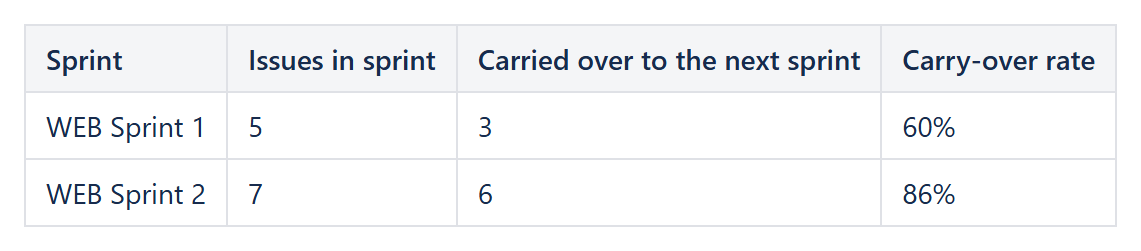
One row per sprint gives the trend; with the Chart macro under the table it becomes a line chart. For several teams, put one table per board on the page.
Variations
- Story points that rolled over: add a column with the story point field, footer aggregate Sum, and
Filter whenJSONARRAYLENGTH(CurrentItem.fields.customfield_10020) >= 2– see Summing story points by sprint and component. - A sprint-end summary: A sprint-end report with Original Estimate totals.
Try it in your own Confluence: CelesteCS Reporting for Confluence and CelesteCS Math for Confluence on the Atlassian Marketplace – free trial for Cloud and Data Center.
Reporting or Math saves you time? A review on the Marketplace – Reporting, Math – helps other teams find them.