In team-managed Jira projects a Story does not show the sum of its Sub-tasks’ original estimates: the Back, Front and QA Sub-tasks each have hours, and the Story looks unestimated. Jira still calculates the totals internally – every issue carries the aggregate fields aggregatetimeoriginalestimate and aggregatetimespent (the issue plus its Sub-tasks), even in team-managed projects. CelesteCS Reporting for Confluence reads those fields, so a Confluence page can show the Story totals without automation rules or helper fields.
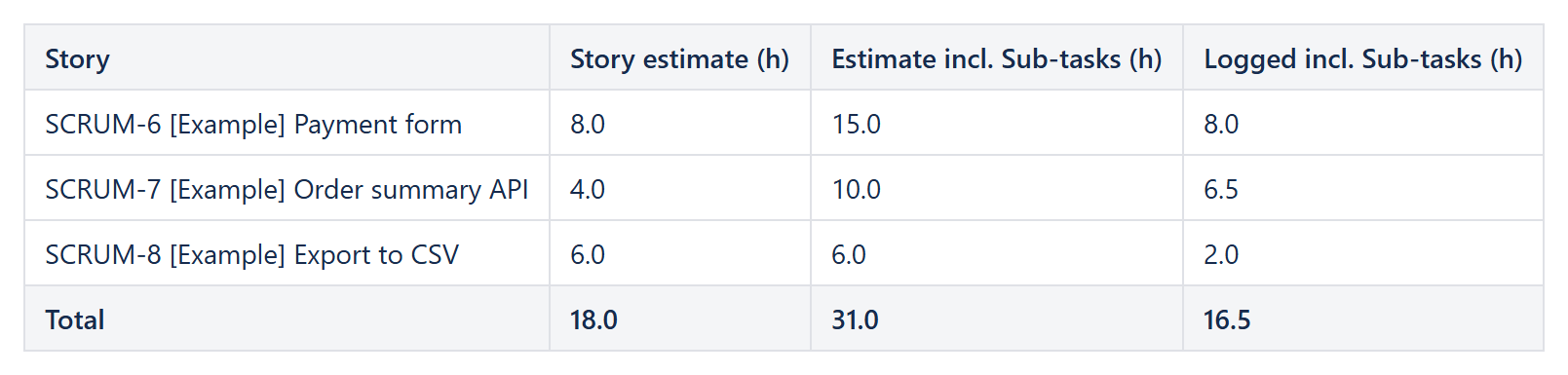
Works on Confluence Cloud and Data Center. The screenshot comes from a team-managed test project: Payment form has an 8 h estimate of its own and two Sub-tasks with 4 h and 3 h, so the total is 15 h.
The configuration
A Reporting Table View with a Reporting Jira Data Provider:
Query:project = APP AND issuetype = Story AND sprint in openSprints()Fields:summary,timeoriginalestimate,aggregatetimeoriginalestimate,aggregatetimespent
and four Reporting Table Items (Jira stores times in seconds, empty when not set):
| Column | Body content | Format / footer |
|---|---|---|
| Story | [CurrentItem.key] [CurrentItem.fields.summary] (Text and expressions in square braces) | Footer content: Total |
| Story estimate (h) | IF(ISNUMBER(CurrentItem.fields.timeoriginalestimate); CurrentItem.fields.timeoriginalestimate / 3600; 0) | Number, 1 decimal, Sum |
| Estimate incl. Sub-tasks (h) | IF(ISNUMBER(CurrentItem.fields.aggregatetimeoriginalestimate); CurrentItem.fields.aggregatetimeoriginalestimate / 3600; 0) | Number, 1 decimal, Sum |
| Logged incl. Sub-tasks (h) | IF(ISNUMBER(CurrentItem.fields.aggregatetimespent); CurrentItem.fields.aggregatetimespent / 3600; 0) | Number, 1 decimal, Sum |
Add a Highlight when formula comparing the logged and estimated totals to mark the Stories that already used more time than planned. The table is read from Jira every time the page is opened, so it follows every new estimate and worklog.
The same aggregate fields one level higher give the Epic totals: Rolling up time from Sub-tasks to the Epic on a Confluence page.
Try it in your own Confluence: CelesteCS Reporting for Confluence on the Atlassian Marketplace – free trial for Cloud and Data Center.
Reporting saves you time? A review on the Marketplace helps other teams find it.