Many teams keep their policies in Confluence: one page per policy, a Page Properties table at the top with the document ID, category, owner, status and review dates, and the native Page Properties Report to list them. The list is the easy part. What compliance actually asks is which policies are overdue for review, and which are due soon – and the native report can't calculate a date, sort by it or highlight it. With the Reporting Page Properties Data Provider in CelesteCS Reporting for Confluence, the same tables give you that register.
Works on Confluence Cloud and Data Center. The policy pages stay as they are.
1. The policy pages
Every policy page has a Page Properties macro with the ID policy and the keys Document ID, Category, Owner, Status, Effective date, Last reviewed, Next review, and the label policy. Create the pages from a page template that already contains the macro and the label, so new policies always follow the same structure. Dates are entered with the date picker.
2. The register
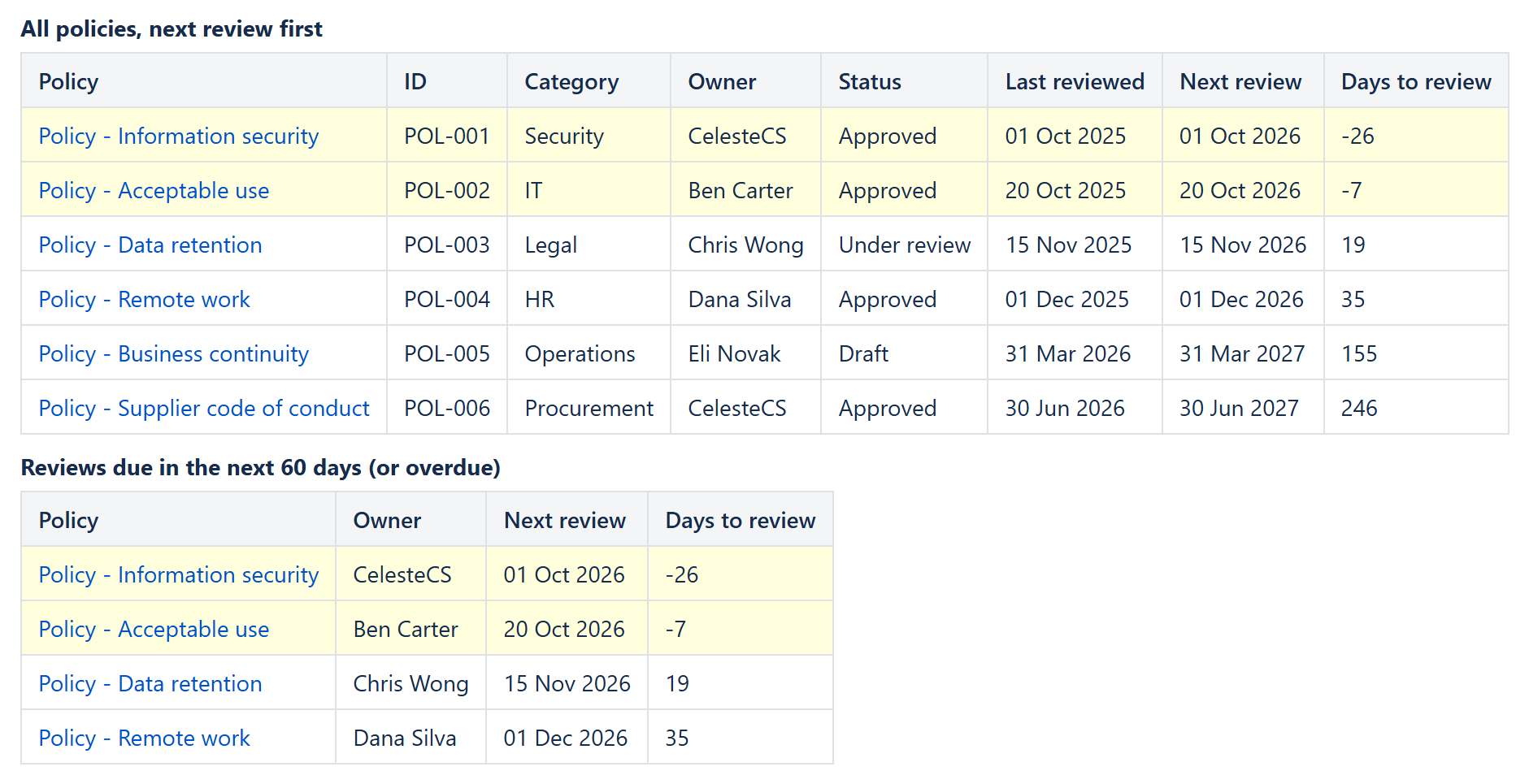
On the register page, insert a Reporting Table View with a Reporting Page Properties Data Provider inside it: Labels policy, Page Properties ID policy, Value format Typed. Set Sort on the Table View to properties.Next_review:date, so the next review comes first. Then add one Reporting Table Item per column – a key with a space is written with an underscore:
| Header | Body content | Options |
|---|---|---|
| Policy | "<a href="/ & CHAR(34) & CurrentItem.url & CHAR(34) & ">" & CurrentItem.title & "</a>" | Body output type: HTML |
| ID | CurrentItem.properties.Document_ID | |
| Owner | CurrentItem.properties.Owner | |
| Status | CurrentItem.properties.Status | |
| Next review | CurrentItem.properties.Next_review | Format type: Date, pattern dd MMM yyyy |
| Days to review | DAYS(DATEVALUE(CurrentItem.properties.Next_review); TODAY()) | Format type: Number; Highlight when: DATEVALUE(CurrentItem.properties.Next_review) < TODAY() |
Overdue policies get a negative number of days and a highlighted row. The register is calculated every time the page is viewed, so when an owner updates Next review after a review, the policy moves down the list at once.
3. Reviews due soon
For a short to-do list on a team or compliance page, copy the report and add a Filter to the data provider: DAYS(DATEVALUE(CurrentItem.properties.Next_review); TODAY()) <= 60. It shows only the overdue policies and the ones due in the next 60 days.
Variations
- Only my policies: Filter
CurrentItem.properties.Owner = "Ben Carter". - Only approved policies: Filter
CurrentItem.properties.Status = "Approved". - Several spaces: list them in Spaces, or select the pages with any CQL, for example
label = "policy" and space in (HR, IT, LEGAL). - Readers filter it themselves: turn on filters for readers in the Table View, and everyone viewing the page gets a search box and a filter per column (category, owner, status).
More on the data provider: a Page Properties report with totals, formulas and sorting and open projects by due date.
Try it in your own Confluence: CelesteCS Reporting for Confluence on the Atlassian Marketplace – free trial for Cloud and Data Center.
Reporting saves you time? A review on the Marketplace – Reporting – helps other teams find it.