The Page Properties Report is the standard way to build a project or document register in Confluence: every page carries a small key / value table, and one report lists them all. It stops being enough as soon as you need numbers: there are no totals, no calculated columns, no sorting by a date or an amount, and long lists are cut off. The new Reporting Page Properties Data Provider in CelesteCS Reporting reads the same Page Properties tables and turns them into a report that can calculate.
Available in Reporting for Confluence 14.0.0 (Data Center). Reporting for Confluence Cloud gets the same macro in its next release.
The pages: nothing changes
Each project page keeps its ordinary Page Properties macro. In this example the macro has the ID project and every page carries the label project:
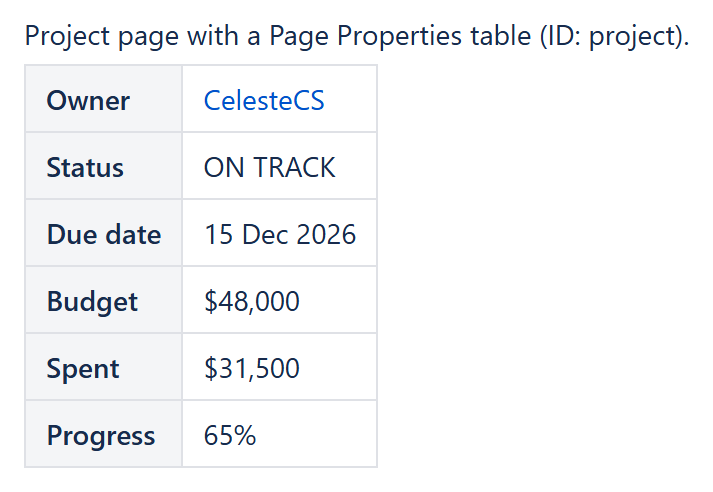
The report
Insert a Reporting Table View macro and put a Reporting Page Properties Data Provider inside it:
- Labels:
project(pages with any of the labels; empty Spaces means the current space) - Page Properties ID:
project - Value format: Typed, so that
$48,000,$31,500and65%become numbers
Then add one Reporting Table Item per column. Every key of the Page Properties table is available as CurrentItem.properties.<key>; a key with spaces, such as Due date, is written with an underscore: CurrentItem.properties.Due_date.
| Header | Body content | Options |
|---|---|---|
| Project | "<a href="/ & CHAR(34) & CurrentItem.url & CHAR(34) & ">" & CurrentItem.title & "</a>" | Body output type: HTML |
| Owner | CurrentItem.properties.Owner | |
| Status | CurrentItem.properties.Status | |
| Due date | CurrentItem.properties.Due_date | Format type: Date, Format pattern: dd MMM yyyy |
| Budget | CurrentItem.properties.Budget | Format type: Currency ($), Format decimals: 0, Footer aggregate: Sum |
| Spent | CurrentItem.properties.Spent | Format type: Currency ($), Format decimals: 0, Footer aggregate: Sum |
| Remaining | CurrentItem.properties.Budget - CurrentItem.properties.Spent | Currency, Sum, Highlight when: CurrentItem.properties.Spent > CurrentItem.properties.Budget |
| Progress | CurrentItem.properties.Progress | Format type: Percent, Format decimals: 0, Footer aggregate: Average |
Set Sort on the Table View to properties.Due_date:date to list the projects by due date.
The result
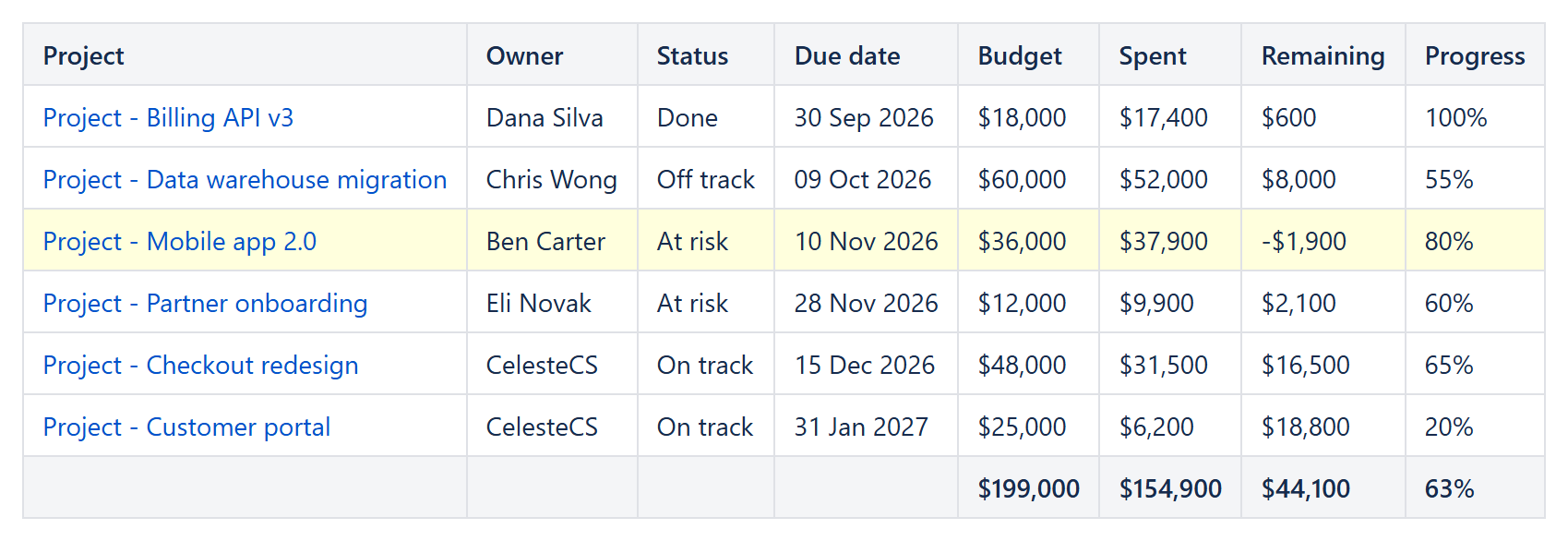
The budget, spent and remaining columns are totalled in the footer, the average progress is shown under the progress column, the project over budget is highlighted, and every title links to its page. The report is calculated every time the page is viewed, so editing a value on a project page updates the report right away.
Good to know
- Hidden Page Properties tables are read too, and a page without a matching table is not listed – the same as in the native report.
- Users are shown by their name, status lozenges by their text, dates as yyyy-MM-dd and page links by the page title.
- Instead of labels you can select the pages with any CQL query, for example
type = page and ancestor = 12345 and label = "project".
Try it in your own Confluence: CelesteCS Reporting for Confluence on the Atlassian Marketplace – free trial for Cloud and Data Center.
Reporting saves you time? A review on the Marketplace helps other teams find it.