A register of all projects quickly gets long. What people usually want on a dashboard page is the opposite view: only the projects that are still running, the closest deadline first, and the overdue ones standing out. With the Reporting Page Properties Data Provider this takes one filter, one sort and one formula.
Available in Reporting for Confluence 14.0.0 (Data Center). Reporting for Confluence Cloud gets the same macro in its next release.
The configuration
- Reporting Page Properties Data Provider: Labels
project, Page Properties IDproject, Value format Typed, Filter:CurrentItem.properties.Status <> "Done" - Reporting Table View: Sort
properties.Due_date:date - A Days left column:
DAYS(DATEVALUE(CurrentItem.properties.Due_date); TODAY())with Format type Number and Highlight whenDATEVALUE(CurrentItem.properties.Due_date) < TODAY()
The result
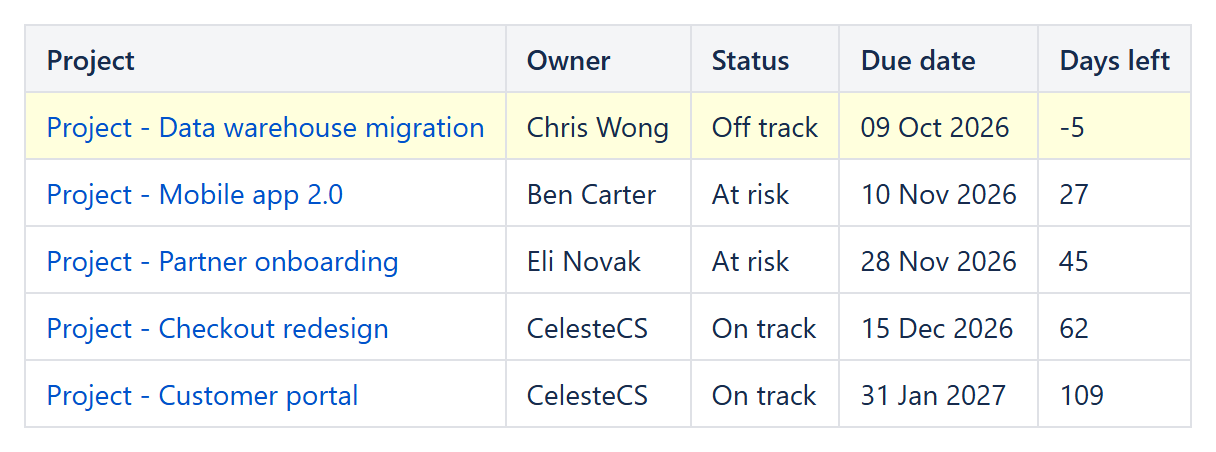
The finished project is left out, the list is ordered by due date, and the overdue project is highlighted with a negative number of days left.
Variations
- One report for every space: leave Spaces empty – the report then always reads the space it is placed in, so the same page can be copied or used in a space template.
- Only my projects:
Filter: CurrentItem.properties.Owner = "Ben Carter". - Due within 30 days:
Filter: DAYS(DATEVALUE(CurrentItem.properties.Due_date); TODAY()) <= 30. - More than one register on a page: give each Page Properties macro its own ID (for example project and risk) and set Page Properties ID in each report.
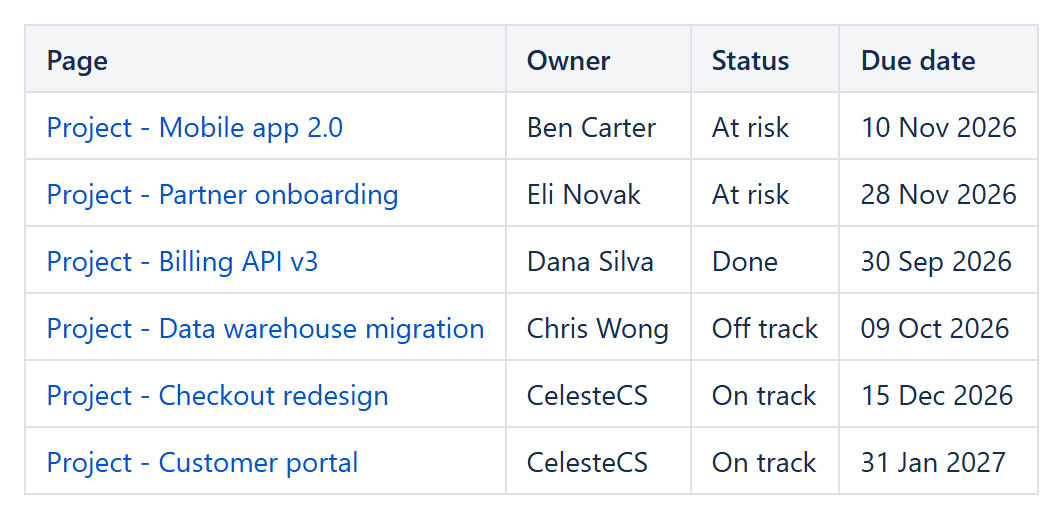
Variation without labels: Filter LEFT(CurrentItem.title; 7) = "Project" on the pages of the current space, sorted by properties.Status,title.
Try it in your own Confluence: CelesteCS Reporting for Confluence on the Atlassian Marketplace – free trial for Cloud and Data Center.
Reporting saves you time? A review on the Marketplace helps other teams find it.