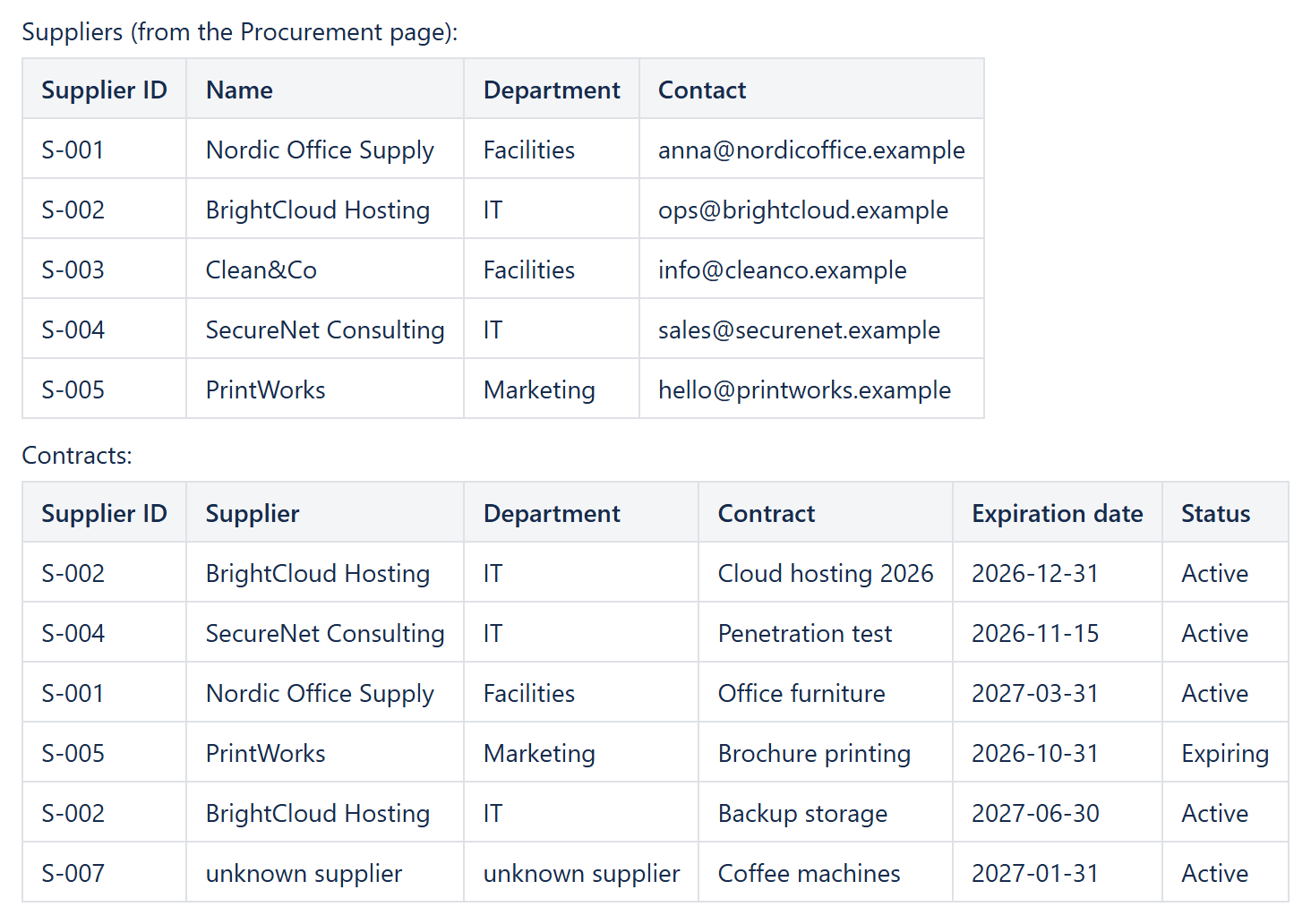
Two teams, two tables, two pages: Procurement keeps the suppliers (Supplier ID, Name, Department, Contact), Legal keeps the contracts (Supplier ID, Contract, Expiration date, Status). Sooner or later someone needs the contracts with the supplier's name and department – and the usual answer is to copy the data into a third table that is out of date the next week. With CelesteCS Math for Confluence the contracts table looks the supplier up by its ID, like VLOOKUP in Excel, and both teams keep their own table.
Works on Confluence Cloud and Data Center, with ordinary Confluence tables – no Databases needed.
1. Share the suppliers table
On the Procurement page, put the suppliers table inside an Excerpt macro and give the excerpt a name, for example suppliers. Nothing else changes for Procurement – they keep editing their table as before.
2. Bring it to the contracts page
On the contracts page, add an Excerpt Include macro above the contracts table: the Procurement page, excerpt suppliers. The suppliers table now shows on the contracts page, always current. For Math it is the first table on the page (Table1), and the contracts table is the second one (Table2). The Include Page macro works the same way if you want the whole page.
3. Look the supplier up
Add the columns Supplier and Department to the contracts table and put a Numerical Expression macro in each of their cells. For the contract in row 2:
Supplier:    IFNA(XLOOKUP(Table2.A2; Table1.A:A; Table1.B:B); "unknown supplier")
Department:  IFNA(XLOOKUP(Table2.A2; Table1.A:A; Table1.C:C); "unknown supplier")
In row 3 the first argument is Table2.A3, and so on. XLOOKUP finds the Supplier ID in column A of the suppliers table and returns the value from column B or C of the same row.
Table1.A:Ais the whole column, so new suppliers are found without changing any formula.IFNAturns a Supplier ID that is not in the suppliers table into a readable "unknown supplier" instead of an error – in the example, contract S-007 shows a supplier Procurement has not added yet.- The lookup runs every time the page is viewed, so a renamed supplier or a changed department shows up in the contracts table at once.
Variations
- The contact as well:
XLOOKUP(Table2.A2; Table1.A:A; Table1.D:D). - Several contracts per supplier: on the suppliers side, count them with
COUNTIFover the included contracts table – see calculated columns and totals by category. - Colour by expiration date: wrap the contracts table in CelesteCS Conditions to highlight contracts that expire within 30 days – see colouring table cells by days left until a date.
Try it in your own Confluence: CelesteCS Math for Confluence on the Atlassian Marketplace – free trial for Cloud and Data Center.
Math saves you time? A review on the Marketplace – Math – helps other teams find it.