Two questions come up again and again: Confluence Databases can sum a column, but have no calculated field per row and no totals per group; and an Excel file attached to a page cannot be edited by several people at once. A normal Confluence table can do both jobs. The whole team edits it together in the page editor, and CelesteCS Math for Confluence adds Excel-style formulas to it: a calculated column, totals per category and a grand total, recalculated every time the page is viewed.
Works on Confluence Cloud and Data Center.
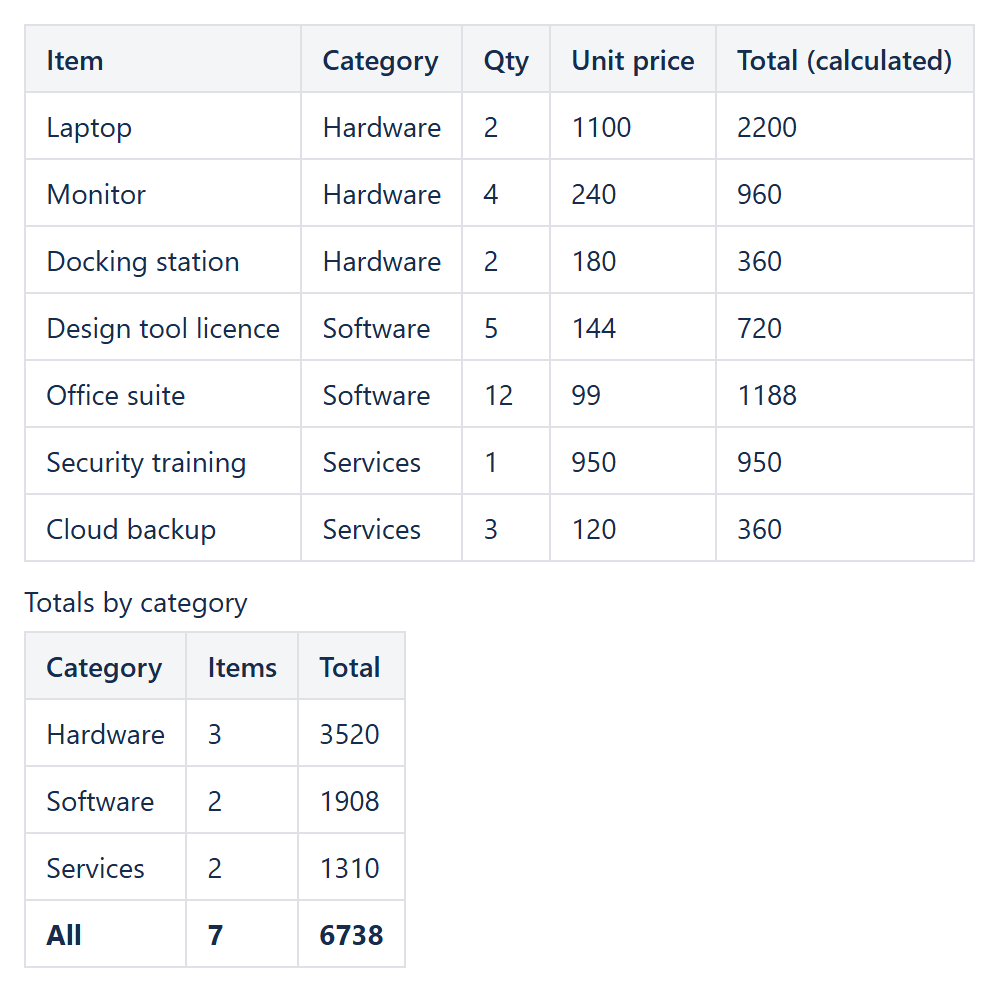
1. A calculated column
Put a Numerical Expression into each cell of the Total column. Tables are numbered from the top of the page, rows and columns work like in Excel:
Table1.C2 * Table1.D2      (Qty × Unit price in row 2)
Table1.C3 * Table1.D3      (row 3, and so on)
Use TEXT(Table1.C2 * Table1.D2; "$#,##0") to show currency, or an IF for conditional values – see per-row formulas like price times tax.
2. Totals by category
A second table groups the first one with SUMIF and COUNTIF. The formulas read the calculated column too:
Items:   COUNTIF(Table1.B2:B8; "Hardware")
Total:   SUMIF(Table1.B2:B8; "Hardware"; Table1.E2:E8)
All:     SUM(Table1.E2:E8)
Several conditions at once work with SUMIFS, COUNTIFS and AVERAGEIFS – see conditional aggregates without extra columns. To colour values over a limit, add CelesteCS Conditions.
Why not a spreadsheet attachment
- Everyone edits the page at the same time; no file is downloaded or re-uploaded.
- Page history, comments, restrictions and search work as for any page.
- The numbers can also come from Jira: calculations over Jira issue fields.
Try it in your own Confluence: CelesteCS Math for Confluence on the Atlassian Marketplace – free trial for Cloud and Data Center.
Math saves you time? A review on the Marketplace – Math – helps other teams find it.