A JQL filter such as worklogDate >= "2026-10-01" AND worklogDate <= "2026-10-31" finds the work items someone logged time on in October. But the Time Spent of those items is everything ever logged on them: if Tom logged 4 hours in September and 7 hours in October on the same item, the export shows 11.
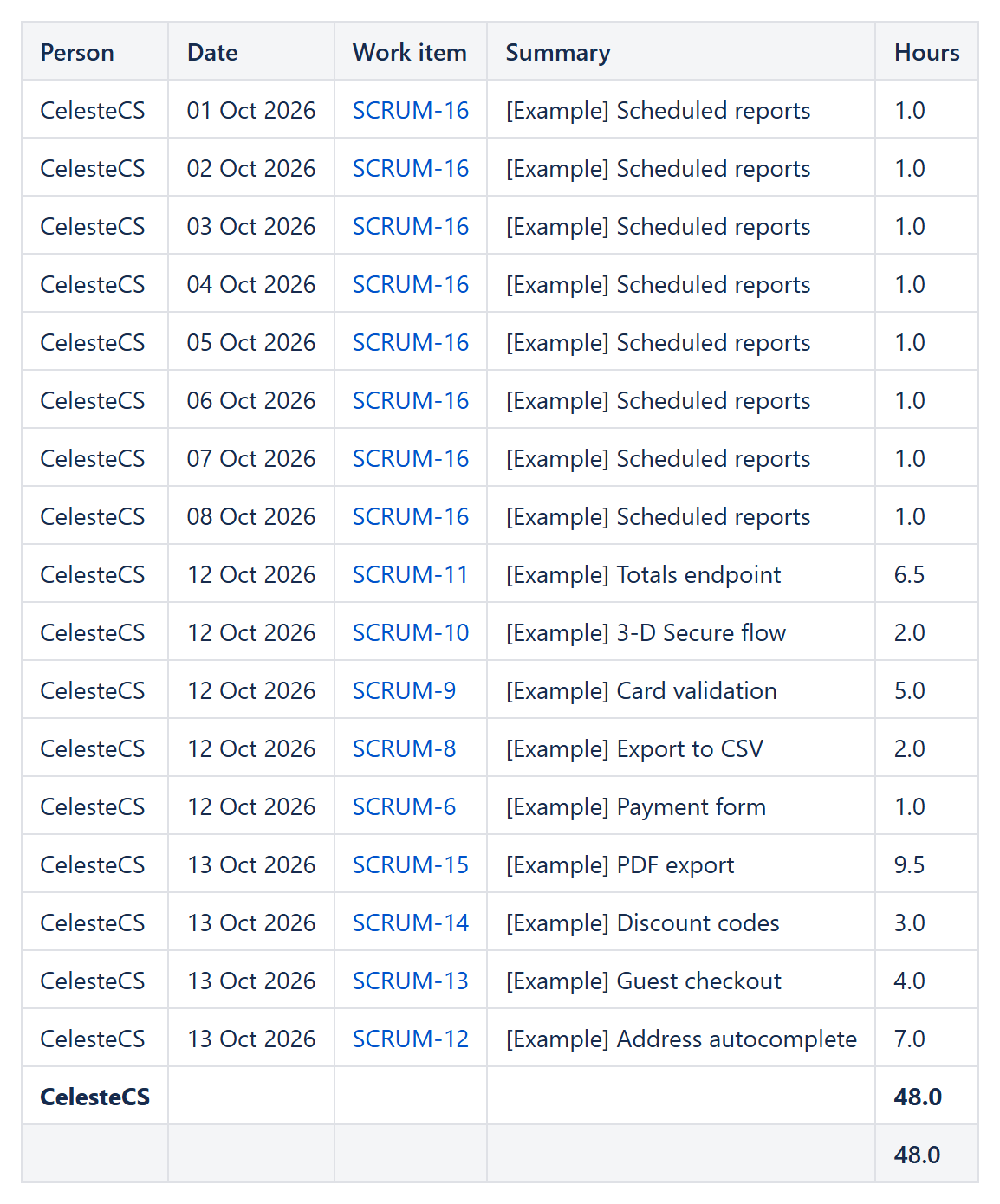
The Jira Data Provider of CelesteCS Reporting for Confluence can return the worklogs themselves, one line per worklog entry, and keep only the entries of the period. A Table View then groups them by person with subtotals.
Checked on Confluence Cloud with Jira Cloud. Data Center: Reporting 15.3.0 or later.
Jira Data Provider
- Query:
worklogDate >= "2026-10-01" AND worklogDate <= "2026-10-31"(addAND project = ABCorAND worklogAuthor = ...as needed) - Fields:
summary - Rows: Worklogs
- Rows from / Rows to:
2026-10-01/2026-10-31– orstartOfMonth(-1)/endOfMonth(-1)for "last month" that moves by itself
Table View
- Group by: Person, Group display: Rows and subtotals (or Subtotals only for one line per person)
- Sort:
date - Columns:
- Person:
CurrentItem.author.displayName - Date:
CurrentItem.date, format Date - Work item:
CurrentItem.issue.key(as a link if you like) - Summary:
CurrentItem.issue.fields.summary - Hours:
CurrentItem.hours, footer aggregate Sum
- Person:
Good to know
- Every worklog of a work item is read, also beyond the 20 that a Jira search returns per item.
- The date is the day the work was done (the worklog's start), not the day the entry was created.
CurrentItem.commentTextgives the worklog comment,CurrentItem.monththe month (2026-10) for a report over several months.- Readers can download the table as CSV or Excel.
Related: estimate vs logged time per Jira work item.
Try it in your own Confluence: CelesteCS Reporting for Confluence on the Atlassian Marketplace – free trial for Cloud and Data Center.
Reporting saves you time? A review on the Marketplace – Reporting – helps other teams find it.