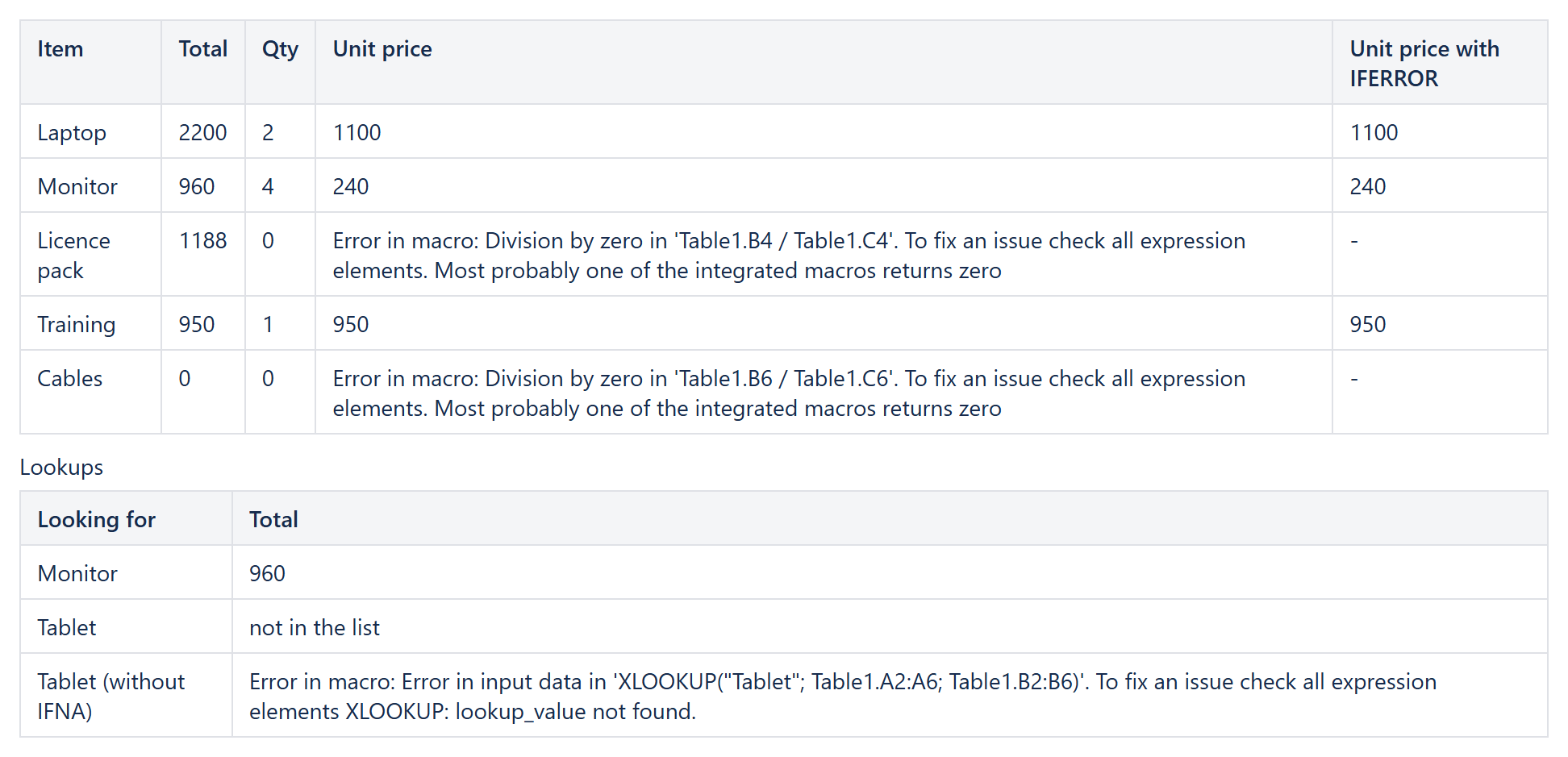
A table with formulas is only as tidy as its worst row: one quantity of zero or one name that is not in the price list, and the cell shows an error message. CelesteCS Math for Confluence now has Excel's IFERROR and IFNA, so such rows show a value you choose – a dash, 0 or "not in the list". The same functions work in Conditions formula rules and in Reporting columns.
Works on Confluence Cloud and Data Center (Math 27.1.0, Conditions 19.1.0, Reporting 15.0.0 or later).
IFERROR: any error
IFERROR(value; value_if_error)
Returns value, or value_if_error when calculating value fails: division by zero, a lookup that finds nothing, an error in a referenced cell, NaN. In the table above, each cell of the last column is a Numerical Expression:
IFERROR(Table1.B2 / Table1.C2; "-")
Only the value that is returned is calculated, so the fallback can itself be a formula: IFERROR(A2 / B2; A2).
IFNA: only "not found"
IFNA(value; value_if_na)
Replaces only the "not found" result of XLOOKUP, XMATCH, MATCH and LOOKUP – Excel's #N/A – and keeps every other error visible, so a real mistake in a formula is not hidden:
IFNA(XLOOKUP("Tablet"; Table1.A2:A6; Table1.B2:B6); "not in the list")
In reports and rules
- Reporting: logged vs. estimated time when an issue has no estimate –
IFERROR(CurrentItem.fields.timespent / CurrentItem.fields.timeoriginalestimate; 0). - Conditions: a formula rule that must not fail on an empty cell –
IFERROR($C2 / $B2 > 1; FALSE()).
More: per-row formulas like price times tax and calculated columns and totals by category.
Try it in your own Confluence: CelesteCS Math for Confluence on the Atlassian Marketplace – free trial for Cloud and Data Center.
Math saves you time? A review on the Marketplace – Math – helps other teams find it.