A frequent pattern once a table has more than a couple of categories in it: you don’t want the sum of a whole column, you want the sum of the rows that match some condition – total sales for one region, count of tasks still open, average score for one team. Doing this by hand means splitting the table or adding helper columns. CelesteCS Math’s *IF family does it in one formula, reading the table exactly as it already exists.
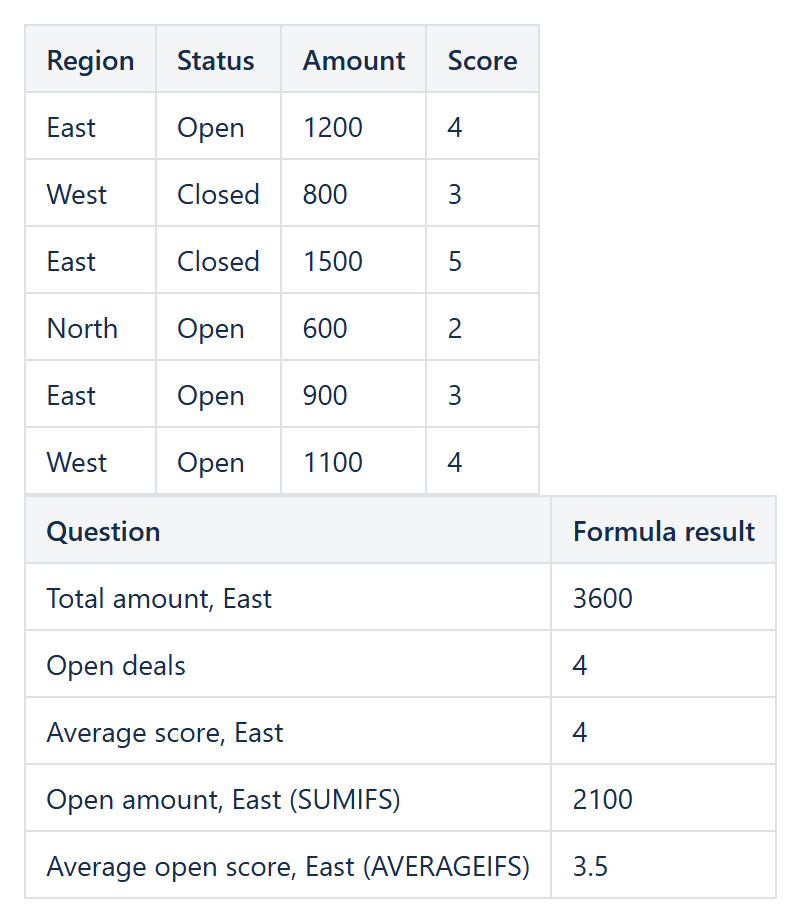
SUMIF: total matching a condition
SUMIF(Table1.A2:A20, "East", Table1.B2:B20)– sums column B for every row where column A equals “East”.
COUNTIF: how many rows match
COUNTIF(Table1.C2:C20, "Open")– counts rows whose status column reads “Open”.
AVERAGEIF: mean of matching rows
AVERAGEIF(Table1.A2:A20, "East", Table1.D2:D20)– the average of column D restricted to the “East” rows.
More than one condition
When a single condition is not enough, SUMIFS, COUNTIFS and AVERAGEIFS take multiple condition/range pairs: SUMIFS(Table1.D2:D20, Table1.A2:A20, "East", Table1.C2:C20, "Open") sums column D only where the region is East and the status is Open, and each function accepts as many condition/range pairs as needed.
Combining with Jira data
The condition/range arguments do not have to come from a table – they work the same way over two JIRAISSUEFIELDVALUES arrays, so SUMIF(JIRAISSUEFIELDVALUES('project = APP', 'Assignee', ''), "Jane Smith", JIRAISSUEFIELDVALUES('project = APP', 'Story Points', 0)) totals Jane’s story points without a separate JQL query per assignee.
The full parameter order for every function mentioned here is in the Functions reference.
Try it in your own Confluence: CelesteCS Math for Confluence on the Atlassian Marketplace – free trial for Cloud and Data Center.
Math saves you time? A review on the Marketplace helps other teams find it.