A common request for a Confluence status page: list every Epic and, under it, all the issues it depends on or is linked to – each linked issue on its own line, with its own status. The Jira Issues macro shows linked issues as one comma-separated cell, and joining two Jira tables in a table add-on often loses rows once the result grows past the add-on’s row limit. CelesteCS Reporting for Confluence asks Jira for the linked issues of each Epic separately, so nothing is joined and nothing is cut off.
Works on Confluence Cloud and Data Center.
1. The configuration
Insert a Reporting List View macro and put four macros inside it, in this order:
- Reporting Jira Data Provider – the Epics:
Query:project = APP AND issuetype = Epic ORDER BY key,Fields:summary - Reporting List Item – one line per Epic:
Body content type:Text and expressions in square braces,Body content:[CurrentItem.key] [CurrentItem.fields.summary],Skip items with no children:true(Epics without links are left out) - Reporting Jira Data Provider – the linked issues of the current Epic:
Query content type:Single expression,Query:"issue in linkedIssues(" & CurrentParentItem.key & ") ORDER BY key",Fields:summary,status - Reporting List Item – one line per linked issue:
Body content type:Text and expressions in square braces,Body content:[CurrentItem.key] [CurrentItem.fields.summary] - [CurrentItem.fields.status.name]
The third macro’s query is a formula: for every Epic, CurrentParentItem.key is replaced with that Epic’s key, and Jira’s own linkedIssues() function returns the issues linked to it.
2. What it looks like
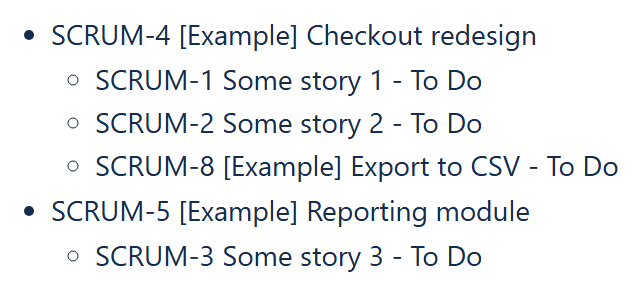
On our test site the page shows:
- SCRUM-4 Checkout redesign
- SCRUM-1 Some story 1 - To Do
- SCRUM-2 Some story 2 - To Do
- SCRUM-8 Export to CSV - To Do
- SCRUM-5 Reporting module
- SCRUM-3 Some story 3 - To Do
Only one link type
To list only the issues an Epic depends on, add the link type to the query, in single quotes: "issue in linkedIssues(" & CurrentParentItem.key & ", 'depends on')". Use the link description exactly as Jira shows it on the issue (for example 'blocks' or 'is blocked by').
More columns per line
Any field can be added to the line: request it in Fields (for example summary,status,assignee,duedate) and reference it in the List Item, e.g. [CurrentItem.fields.assignee.displayName] or [CurrentItem.fields.duedate]. A third level (for example the Sub-tasks of each linked issue) works the same way, see Building a multi-level Jira issue tree with Reporting List View.
Because each Epic’s links are requested separately, the size of the result does not depend on a join limit, and the list is read live from Jira every time the page is opened.
Try it in your own Confluence: CelesteCS Reporting for Confluence on the Atlassian Marketplace – free trial for Cloud and Data Center.
Reporting saves you time? A review on the Marketplace helps other teams find it.