Confluence’s own Status macro – the small colored pill you can insert to mark something as Green/Done or Red/Blocked – is a common way to make a status column stand out. Adding one by hand to every row of a table works fine for a table you fill in once, but it stops working the moment the table is generated or refreshed automatically, for example from Jira with CelesteCS Reporting or from a formula with CelesteCS Math: there is no macro to hand-place a Status macro into.
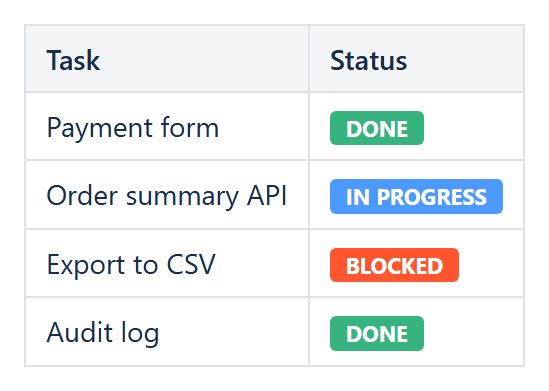
The Conditional Rule macro’s Insert status color parameter solves exactly this: instead of coloring the cell’s own background or text, it replaces the cell’s content with a genuine Confluence-style status lozenge, driven by the same conditions as any other rule.
How it works
Insert status color– None (default), Grey, Red, Yellow, Green, Blue or Purple. Set to any color other than None to enable the feature; it takes over fromReplacement textfor any cell the rule matches.Insert status title– the text shown inside the lozenge. Leave it empty and the cell’s own original value becomes the title, so a cell that already reads “Done” simply becomes a green “Done” lozenge with no extra typing.
Example: turning a status column into lozenges
Inside a Conditional Rules Manager wrapping a status column, three Conditional Rule macros:
- Rule condition: Element text contains, Value 1:
Done, Insert status color:Green - Rule condition: Element text contains, Value 1:
In Progress, Insert status color:Blue - Rule condition: Element text contains, Value 1:
Blocked, Insert status color:Red
Leave Insert status title empty on all three so each lozenge simply repeats the cell’s own text. Because this is a normal Conditional Rule, it can be layered on top of a table built by CelesteCS Reporting from Jira or Confluence data just as well as a table typed in by hand – the lozenges regenerate on every page view along with the rest of the row.
Combining it with a formula-based rule
Insert status color also works with Formula result value is true rules, so a numeric health score can drive a lozenge the same way it can drive a background color: for example Value 1: A1 >= 80 with Insert status color: Green and a custom Insert status title of “Healthy”, giving a clean pill label instead of a raw number, without the underlying score column needing to change at all.
Insert status color is a Data Center feature; if you are on Confluence Cloud, the colored background/text options of the same Conditional Rule macro give an equivalent visual result.
Try it in your own Confluence: CelesteCS Conditions for Confluence on the Atlassian Marketplace – free trial for Cloud and Data Center.
Conditions saves you time? A review on the Marketplace helps other teams find it.