Before these parameters existed, getting a Reporting Table View into a specific order, with duplicates removed and only the top handful of rows shown, meant either accepting whatever order the underlying JQL/CQL query returned, or writing custom formulas to fake it. The Table View macro now does all three natively, applied in a fixed, predictable order: Sort, then Distinct by, then Limit – each one working over the fetched rows before any column formula is evaluated, so the formulas in your Table Item macros never need to know sorting happened at all.
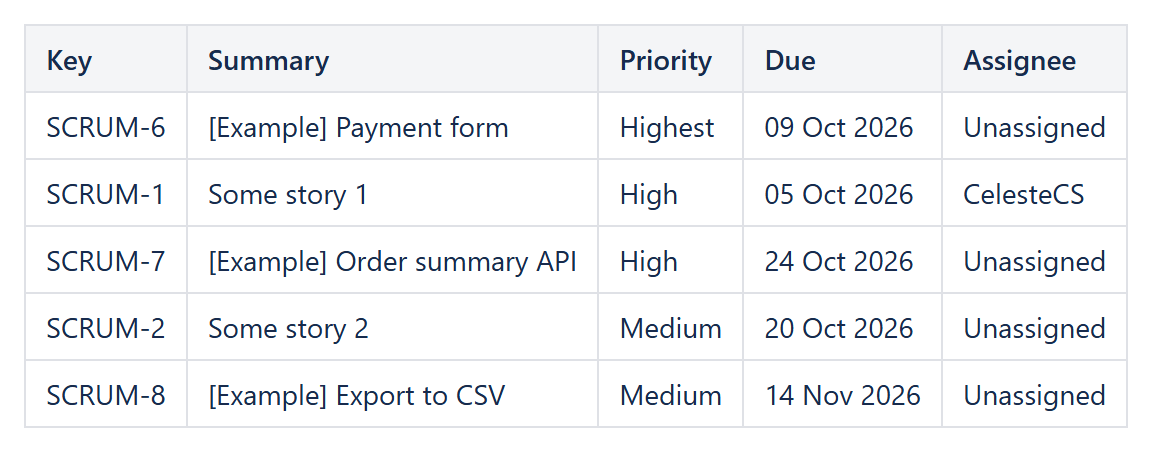
Sort
A comma-separated list of JSON field paths, using the same dotted notation as any Table Item formula (fields.priority, history.lastUpdated.when, and so on). A leading - sorts that key descending; no prefix (or an explicit +) sorts ascending. Multiple keys sort exactly like a multi-column Excel sort: city,-points groups by city, then within each city puts the highest points first.
Type hints
Without a hint, a key sorts numerically when both sides of a comparison look like numbers, and as case-insensitive text otherwise – which is usually right, but not always what you want for a field that mixes formats. Add :text, :number or :date after a key to force the comparison: created:date,-points:number guarantees the date column sorts chronologically rather than as a string, even if some values happen to look numeric. Rows with no value for a given key always sort last for that key, regardless of direction.
Distinct by
A comma-separated list of field paths forming a composite key; only the first row for each distinct combination of values is kept, and it is applied after Sort – so sort by whichever field should “win” the duplicate first, then deduplicate. For example, sorting by fields.priority.id:number (Jira priority IDs go from 1 = Highest down) and then setting Distinct by: fields.assignee.displayName keeps exactly one row per assignee: their highest-priority open issue.
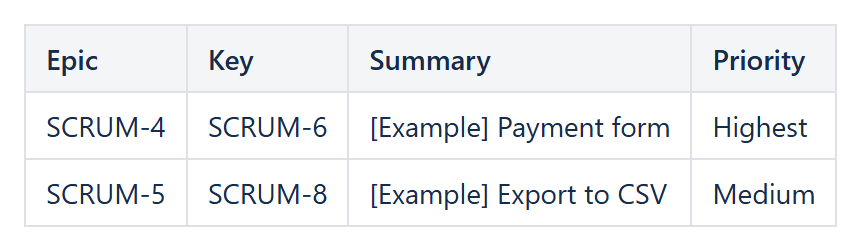
Example: Sort fields.priority.id:number + Distinct by fields.parent.key - the highest-priority story of each epic.
Limit
The maximum number of rows to keep, applied last, after both Sort and Distinct by. A value of 0 or less means no limit. Combined with the two parameters above, a “top 5 highest-priority issue per assignee, five assignees only” report is three parameters on the Table View macro and no extra formulas anywhere:
Sort: fields.priority.id:numberDistinct by: fields.assignee.displayNameLimit: 5
All three parameters work the same way regardless of which data provider feeds the Table View – Jira, Confluence or JSON – and the same way on Confluence Server/Data Center and Confluence Cloud. See the Reporting Table View reference for the complete parameter list.
Try it in your own Confluence: CelesteCS Reporting for Confluence on the Atlassian Marketplace – free trial for Cloud and Data Center.
Reporting saves you time? A review on the Marketplace helps other teams find it.