Confluence’s built-in Analytics is aimed at view counts and engagement – it will tell you a page was viewed 40 times last week, but not who wrote it or who last touched it. That information exists (Confluence tracks it for every page), it is just not exposed as a report. CelesteCS Reporting can pull it directly, because the Reporting Confluence Data Provider macro reads the same content history data Confluence itself uses.
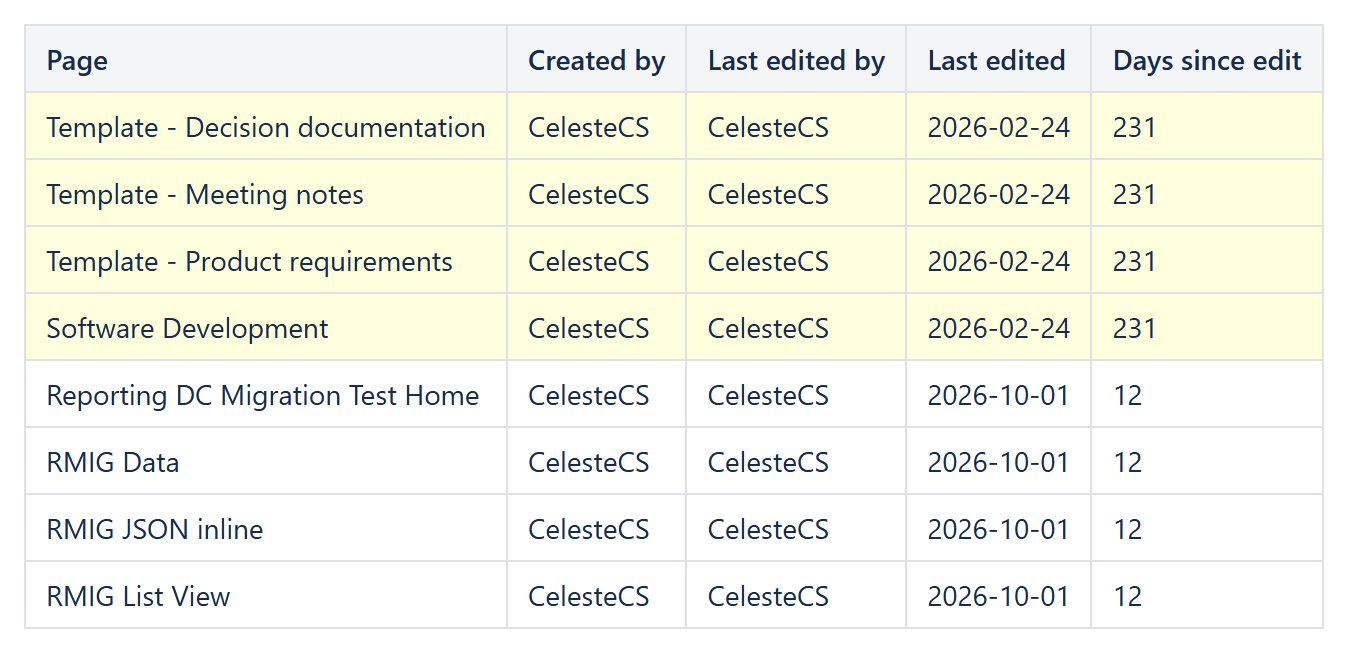
Getting history data into the report
Set the data provider’s Expand parameter to history,history.lastUpdated so each returned page includes its creation and last-update details, then reference the fields with any Reporting Table Item:
CurrentItem.title– the page titleCurrentItem.history.createdBy.displayName– who originally created the pageCurrentItem.history.createdDate– when it was createdCurrentItem.history.lastUpdated.by.displayName– who last edited itCurrentItem.history.lastUpdated.when– when that last edit happened
Example: a stale-content report for a space
A Reporting Confluence Data Provider with Query: space = TEAM and type = page, feeding a Table View with columns for title, last editor and last-edited date, gives a maintainers’ view Analytics does not: exactly who last touched every page. Add a Sort of history.lastUpdated.when:date (ascending, i.e. without a leading -) to put the stalest pages first, and a Highlight when formula such as DAYS(TODAY(), DATEVALUE(LEFT(CurrentItem.history.lastUpdated.when, 10))) > 180 on one of the columns to flag anything untouched for more than six months.
Example: who is actually writing documentation?
The same history.createdBy.displayName field, fed through a Footer aggregate: Count after filtering to one author with the data provider’s Filter parameter, gives a per-person page count – useful for recognizing who is doing the writing on a large space where that is otherwise invisible.
Because this is built on the same CQL search every other Confluence report in the plug-in uses, it combines freely with everything else CelesteCS Reporting can do – sorting, limiting, per-column formatting, and conditional row highlighting – so a stale-content or contribution report is a normal Reporting Table View, not a special case.
Try it in your own Confluence: CelesteCS Reporting for Confluence on the Atlassian Marketplace – free trial for Cloud and Data Center.
Reporting saves you time? A review on the Marketplace helps other teams find it.