Atlassian is retiring several legacy Jira Cloud reports, among them the Version Report, Release Burndown and Epic Burndown. Teams that used them to tell stakeholders how far a release or an epic has come need another place for those numbers. A Confluence page with CelesteCS Math for Confluence can show them live from Jira, next to the release notes and plans that already live in Confluence.
Works on Confluence Cloud and Data Center. On Cloud insert CelesteCS Numerical Expression Cloud and CelesteCS Chart.
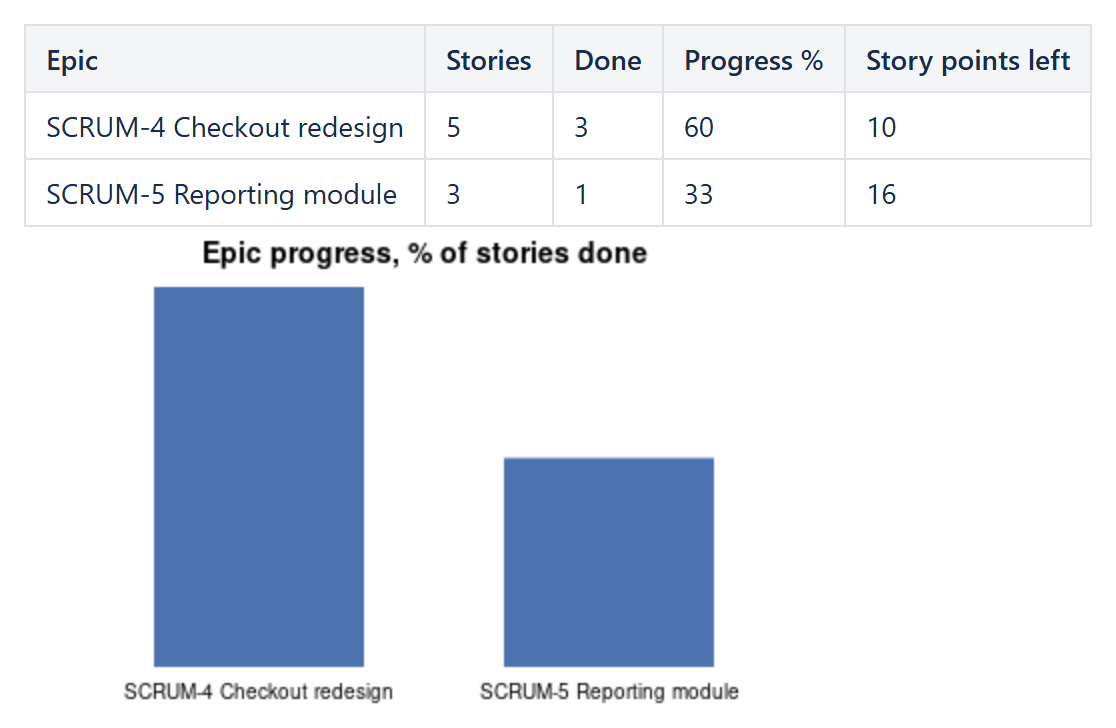
1. Progress per epic or per version
Create a table with one row per epic (or per release) and a Numerical Expression macro in each calculated cell:
| Column | Formula |
|---|---|
| Stories | JIRAISSUECOUNT("parent = APP-100") |
| Done | JIRAISSUECOUNT("parent = APP-100 AND statusCategory = Done") |
| Progress % | ROUND(JIRAISSUECOUNT("parent = APP-100 AND statusCategory = Done") / JIRAISSUECOUNT("parent = APP-100") * 100, 0) |
| Story points left | SUM(JIRAISSUEFIELDVALUESBYFIELDID("parent = APP-100 AND statusCategory != Done", "customfield_10016", 0)) |
For a release instead of an epic, use fixVersion = "2.0" in the queries – that is the core of the old Version Report. The story points field ID differs between sites; Determining the field ID by its name shows how to find yours.
2. The chart
A CelesteCS Chart macro below the table with Data range: Table1.D2:D3, Labels range: Table1.A2:A3 and Chart type: Bar draws the progress of every epic. The chart reads the values the formulas calculate, so it follows Jira on every page view.
3. A burndown by issue count
For a burndown over time, count what was still open at the end of each week with Jira's status history, one row per week:
JIRAISSUECOUNT("fixVersion = \"2.0\" AND status WAS NOT IN (Done) ON endOfWeek(-3)")
and draw the column as a Line chart. The step-by-step version of this is in A weekly trend chart of Jira issue counts. This burns down issues, not story points: JQL has no history for field values, so a points-based burndown over past weeks is not possible this way.
Try it in your own Confluence: CelesteCS Math for Confluence on the Atlassian Marketplace – free trial for Cloud and Data Center.
Math saves you time? A review on the Marketplace helps other teams find it.