Confluence’s built-in Jira Issues macro is column-limited: some custom fields render blank inside it, others cannot be added as a column at all, and a field that stops rendering after a Jira or Confluence upgrade is a genuinely common complaint. Because CelesteCS Math and CelesteCS Reporting read Jira data directly rather than through that macro’s own rendering path, both can retrieve a field the Jira Issues macro refuses to show.
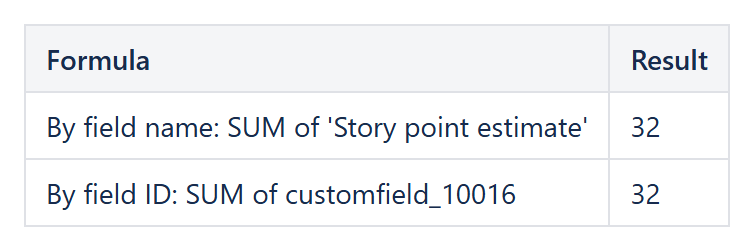
By field name
JIRAISSUEFIELDVALUES('project = APP', 'Story Points', 0, 'Company Jira')
By field ID, when the name is ambiguous or renamed
Custom field names can be renamed in Jira without the underlying ID changing, and two fields can end up with very similar display names on a busy instance. Referencing the ID sidesteps both problems:
JIRAISSUEFIELDVALUESBYFIELDID('project = APP', 'customfield_10037', 0, 'Company Jira')
See our earlier article on determining the field ID by its name for four different ways to find that identifier.
Putting it in a report, not just a formula
The same custom field is available inside a CelesteCS Reporting Table Item’s body formula as CurrentItem.fields.customfield_10037, which is often more convenient than a single-cell formula when the goal is a whole column of values, one row per issue, rather than one aggregated number.
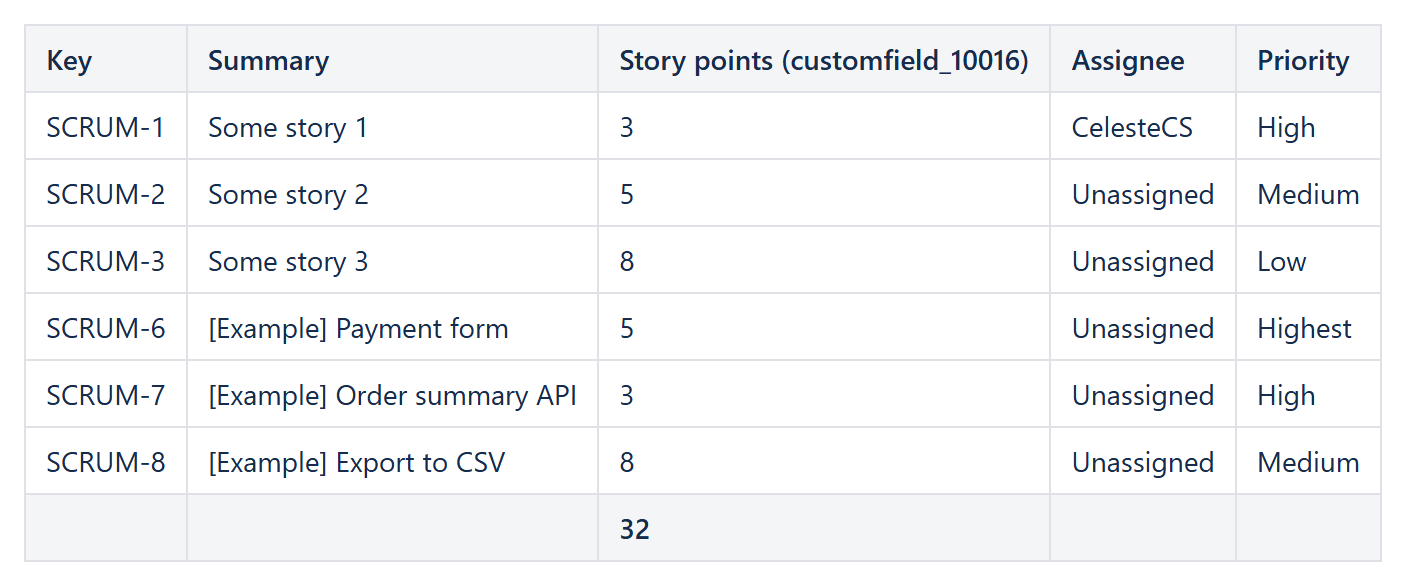
Example: the Story points custom field (customfield_10016) as a report column with a Sum footer.
A note on custom field value shapes
Not every custom field is a plain string or number: a Jira user picker field comes back as an object with a displayName, a multi-select field comes back as an array, and a cascading select comes back nested. When a field’s value looks unexpectedly empty, it is worth first checking with CurrentItem (Reporting) whether the field is actually an object or array rather than a plain value – reading CurrentItem.fields.customfield_10037.value (or [0].value for a multi-select) instead of the bare field is usually the fix.
Try it in your own Confluence: CelesteCS Reporting for Confluence on the Atlassian Marketplace – free trial for Cloud and Data Center.
Reporting saves you time? A review on the Marketplace helps other teams find it.