A Jira report on a Confluence page is read by many people, and each of them wants a different slice: only the bugs, only one epic, only what is assigned to them. Until now that meant one table per audience, or an extra filter app wrapped around the Jira macro – which in Confluence Cloud breaks the column wrapping of the Jira Work Items macro and leaves a very wide table. CelesteCS Reporting for Confluence now has Filters for readers: one switch in the Table View, and everyone who opens the page can search, filter and sort the report themselves.
Works on Confluence Cloud and Data Center (Data Center 9.2 – 11, Reporting 15.0.0 or later).
1. The report
A Reporting Table View with a Reporting Jira Data Provider:
Query:project = WEB AND issuetype in (Story, Bug, Task) ORDER BY priority DESC, keyFields:summary,issuetype,status,priority,parent,assignee
One Reporting Table Item per column:
| Header | Body content |
|---|---|
| Key | CurrentItem.key (Footer aggregate: Count) |
| Summary | CurrentItem.fields.summary |
| Type | CurrentItem.fields.issuetype.name |
| Epic | CurrentItem.fields.parent.fields.summary |
| Status | CurrentItem.fields.status.name |
| Priority | CurrentItem.fields.priority.name |
| Assignee | IF(ISBLANK(CurrentItem.fields.assignee.displayName); "Unassigned"; CurrentItem.fields.assignee.displayName) |
2. Turn on Filters for readers
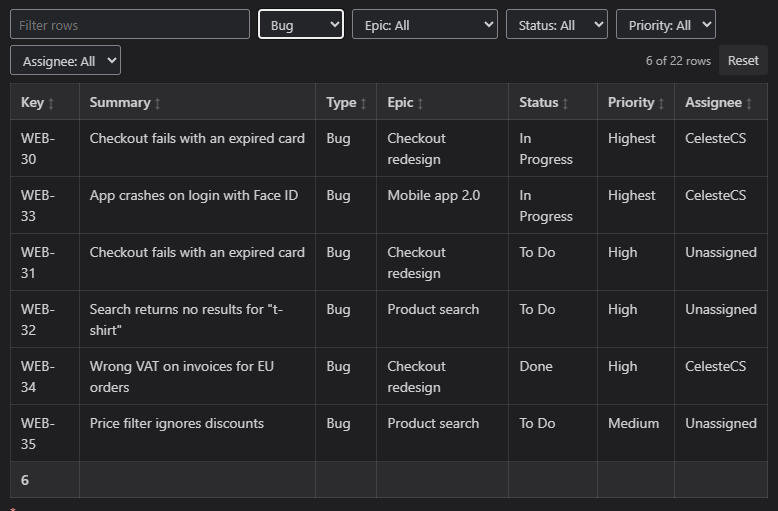
In the Table View, set Filters for readers to Search and column filters. On the page, readers get:
- a search box over all cells;
- a drop-down filter for every column whose values repeat – Type, Epic, Status, Priority, Assignee;
- sorting by a click on a column header (click again for descending), with numbers and dates sorted by value;
- an "X of Y rows" counter and Reset.
Footer aggregates follow the filter: the Count above says 6 because 6 bugs are visible. Nothing is saved – each reader filters their own view, and the page stays the same for everyone else. The columns wrap like any Confluence table, so the report fits the page width.
3. Example: bugs by roadmap item
Which roadmap item (epic) produces the bugs? A second Table View with project = WEB AND issuetype = Bug and the epic as the first column:
Roadmap item (Epic):  IF(ISBLANK(CurrentItem.fields.parent.fields.summary); "No roadmap item"; CurrentItem.fields.parent.fields.summary)
Bug:                  CurrentItem.key & " " & CurrentItem.fields.summary     (Footer aggregate: Count)
Priority:             CurrentItem.fields.priority.name     (Highlight when: Highest or High)
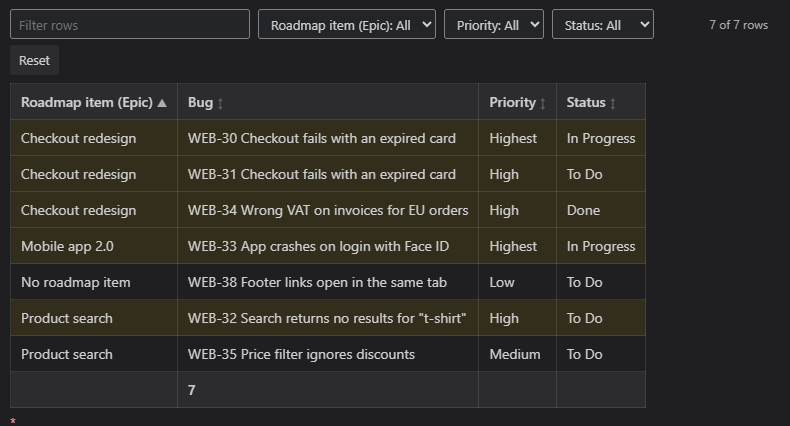
Bugs without a parent are not lost – they show up as No roadmap item, so nobody has to force a parent on every bug to keep the report complete. Readers pick an epic in the filter and see its bugs and their count; a click on the header groups the table by epic.
Variations
- Your own work: add a column with the assignee and let each reader pick themselves in its filter.
- Several reports on one page: every Table View gets its own toolbar.
- Not only Jira: the same works for reports from Confluence pages, Page Properties and JSON.
Try it in your own Confluence: CelesteCS Reporting for Confluence on the Atlassian Marketplace – free trial for Cloud and Data Center.
Reporting saves you time? A review on the Marketplace – Reporting – helps other teams find it.