A table that is mostly filled in is often more dangerous than one that is obviously incomplete – a single missing due date or owner buried in an otherwise full table is easy to miss during a review, and easy to notice automatically. The Conditional Rule macro’s Element is blank and Element is not blank conditions exist for exactly this.
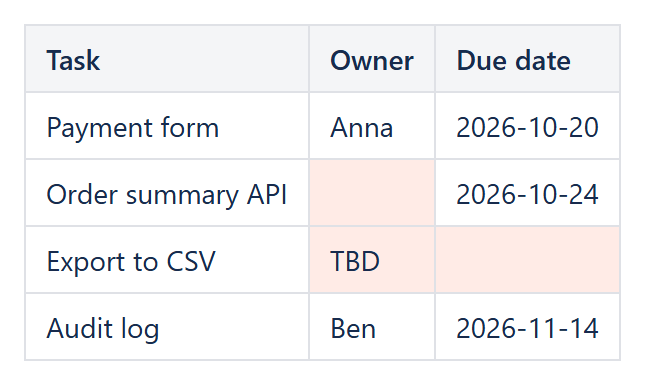
Flagging missing required fields
Inside a Conditional Rules Manager wrapping the table, a rule with Rule condition: Element is blank, Applies to set to the required column (for example Table1.C:C for an “Owner” column), and a background color, highlights every empty cell in that column at a glance – no need to visually scan a long table row by row.
Confirming completeness instead
The inverse rule, Element is not blank, is useful when the goal is to positively confirm coverage rather than flag gaps – for example coloring the cells that already have a value green, so a partially-filled column reads as a progress indicator rather than a list of blanks.
Combining with a text condition
“Blank” and “filled with a placeholder” are different problems – a cell containing a single space or the word “TBD” is not blank as far as the check is concerned (blank is measured by text length being exactly zero). Add a second rule with Rule condition: Element text contains, Value 1: TBD, and the same highlight color, to catch placeholder text the blank check alone would miss.
Applying it to a Reporting table
Because this is a normal Conditional Rule macro, it works exactly the same way over a table built by CelesteCS Reporting from Jira or Confluence data – useful for flagging, for example, Jira issues with no assignee or no due date the moment the report is generated, rather than after someone notices the gap manually.
Try it in your own Confluence: CelesteCS Conditions for Confluence on the Atlassian Marketplace – free trial for Cloud and Data Center.
Conditions saves you time? A review on the Marketplace helps other teams find it.