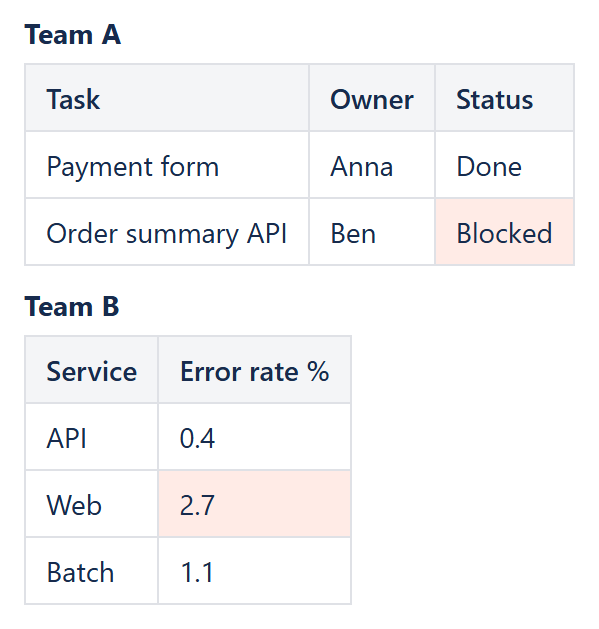
A page with more than one table – one per team, one per quarter, one per region – does not need a separate Conditional Rules Manager for each. A single Conditional Rules Manager wrapping all of the tables, with the Applies to parameter on each rule pointing at specific tables, applies the same or different rules across all of them from one place.
Targeting one specific table
Applies to accepts a table-qualified range, for example Table2.C:C, so a rule can target only the second table on the page even when several tables share the Rules Manager body.
Targeting several ranges at once
Separate multiple ranges with ; to apply one rule everywhere it is needed without repeating the whole rule: Table1.C:C; Table2.C:C; Table3.C:C applies the same rule to the status column of three different tables in one go. This also works for a single table with non-adjacent columns, for example Table1.A:B; Table1.D:D to skip column C.
Different rules for different tables
Nothing stops each Conditional Rule macro inside the same manager from targeting a different table with a different condition – one rule with Applies to: Table1.C:C and a status-based condition, another with Applies to: Table2.B:B and a numeric threshold condition, both inside the same Conditional Rules Manager wrapping both tables. This keeps a page’s worth of conditional formatting in one predictable place instead of scattered across several separate macro instances, which also makes it much easier to see and adjust the whole set of rules later.
See the Conditional Rule reference for the exact Applies to syntax, including row ranges and combining a table qualifier with a row range.
Try it in your own Confluence: CelesteCS Conditions for Confluence on the Atlassian Marketplace – free trial for Cloud and Data Center.
Conditions saves you time? A review on the Marketplace helps other teams find it.