Raw JQL or CQL results rarely look presentable straight away – a timestamp comes back as a long ISO string, a monetary field is a plain number with no currency symbol, and a ratio needs multiplying by 100 to read as a percentage. Rather than wrapping every Reporting Table Item’s body formula in a TEXT() call by hand, the column itself can be told how to format its own value.
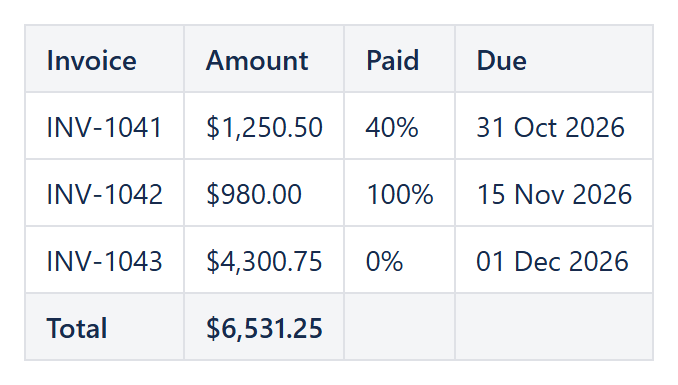
Number and currency
Set Value format to Number and Decimal places to control how many fraction digits are shown – the column then uses the Table View’s own Decimal symbol/Digit grouping symbol, so every numeric column on the report is consistent even if it was built from several different data providers. Currency does the same thing plus prepends a Currency symbol such as $ or EUR .
Percent
Percent multiplies the underlying value by 100 and appends %, so a body formula returning a plain ratio like 0.42 displays as 42.00% without the formula itself needing a * 100.
Date
Date reformats the value using a Format pattern such as dd MMM yyyy, and accepts either an Excel-style date serial (what a date-producing formula naturally returns) or a handful of common date strings – useful directly on a field like CurrentItem.fields.duedate without a DATEVALUE/TEXT wrapper in the body formula itself.
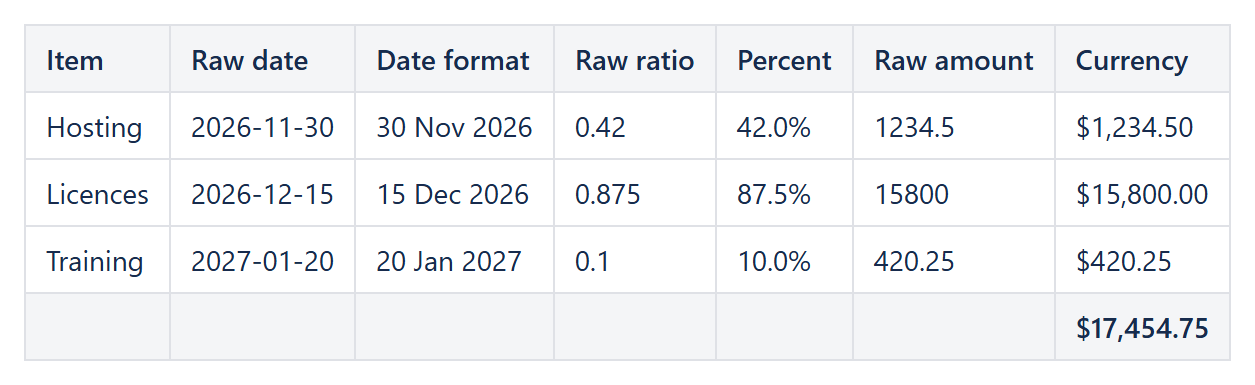
Example: raw values next to the same values with Format type Date, Percent and Currency.
Applying it to totals too
Whatever Value format is set on a column also applies to that column’s footer, so a Footer aggregate: Sum on a Currency-formatted column shows its total with the same currency symbol and decimal places as every value above it, with no separate formatting step for the footer.
When a value doesn’t parse
If a cell’s value cannot be read as a number (or, for Date, as a date), formatting is skipped and the original text passes through unchanged – a stray non-numeric value in an otherwise numeric column never breaks the rest of the report.
Try it in your own Confluence: CelesteCS Reporting for Confluence on the Atlassian Marketplace – free trial for Cloud and Data Center.
Reporting saves you time? A review on the Marketplace helps other teams find it.