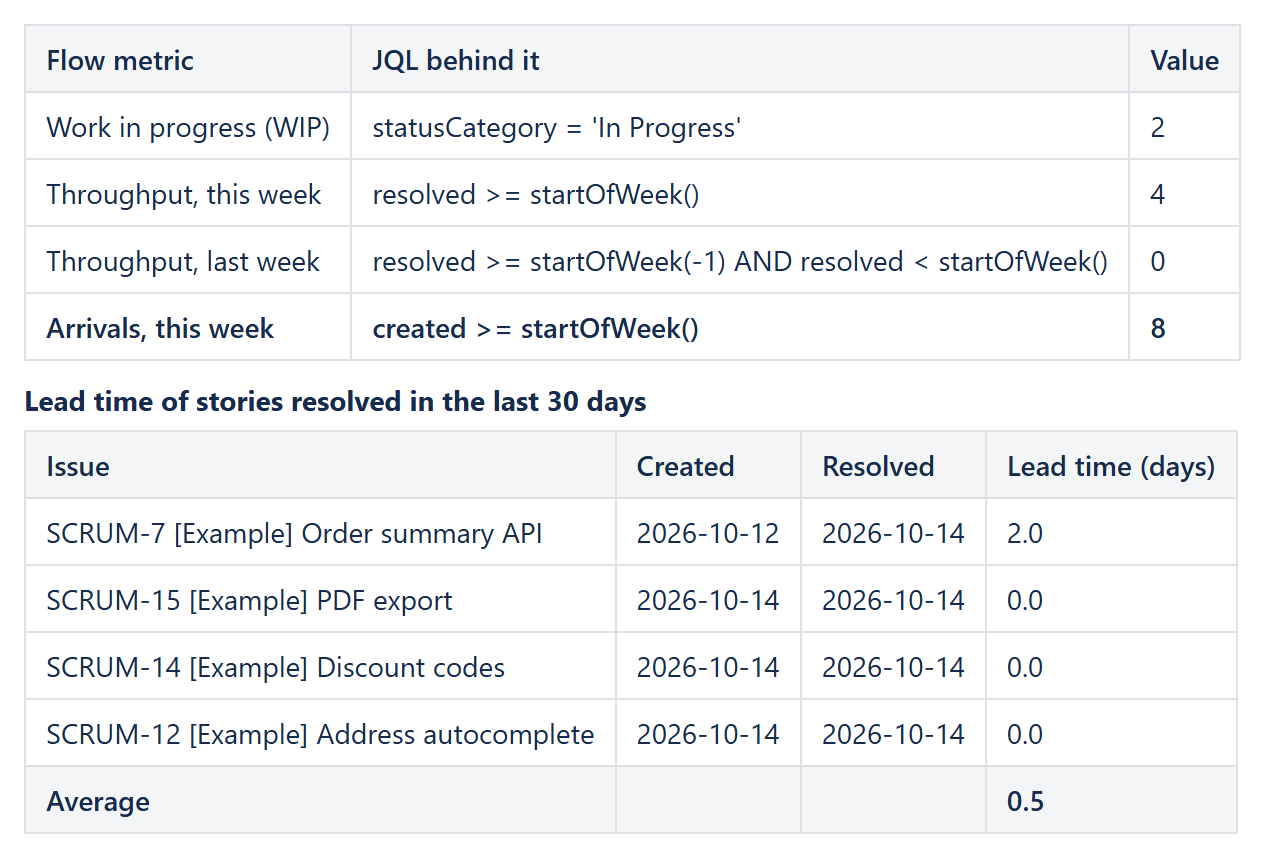
Flow metrics – work in progress, throughput, arrivals and lead time – are usually asked for as one overview, while Jira spreads them over the Control Chart, the Cumulative Flow Diagram and a handful of saved filters. A Confluence page can put them side by side, live from Jira: CelesteCS Math for Confluence counts issues with JQL, and CelesteCS Reporting for Confluence lists the resolved issues with their lead time and the average in the footer.
Works on Confluence Cloud and Data Center. On Cloud insert the Cloud variants of the macros.
1. WIP, throughput and arrivals with Math
Create a small table and put a Numerical Expression macro into each value cell. Every formula is one JQL count:
| Metric | Formula |
|---|---|
| Work in progress | JIRAISSUECOUNT("project = ABC AND statusCategory = 'In Progress'") |
| Throughput, this week | JIRAISSUECOUNT("project = ABC AND resolved >= startOfWeek()") |
| Throughput, last week | JIRAISSUECOUNT("project = ABC AND resolved >= startOfWeek(-1) AND resolved < startOfWeek()") |
| Arrivals, this week | JIRAISSUECOUNT("project = ABC AND created >= startOfWeek()") |
Use single quotes inside the JQL, as in 'In Progress', so they do not clash with the double quotes of the formula. One row per week with startOfWeek(-1), startOfWeek(-2) and so on, plus a CelesteCS Chart macro with Chart type: Line, turns throughput into a trend; A weekly trend chart of Jira issue counts shows that step by step.
2. Lead time per issue with Reporting
Insert a Reporting Table View with a Reporting Jira Data Provider inside:
- Query:
project = ABC AND issuetype = Story AND resolved >= -30d ORDER BY resolved DESC - Fields:
summary,created,resolutiondate
Then add one Reporting Table Item per column:
| Column | Body (Single expression) | Footer |
|---|---|---|
| Issue | [CurrentItem.key] [CurrentItem.fields.summary] (Text and expressions in square braces) | Text: Average |
| Created | TEXT(DATEVALUE(CurrentItem.fields.created); "YYYY-MM-DD") | |
| Resolved | TEXT(DATEVALUE(CurrentItem.fields.resolutiondate); "YYYY-MM-DD") | |
| Lead time (days) | DAYS(DATEVALUE(CurrentItem.fields.resolutiondate); DATEVALUE(CurrentItem.fields.created)), Format: Number, 1 decimal | Aggregate: Average |
Reporting separates function arguments with a semicolon. The footer average is the mean lead time of the period; change -30d in the query to look at a sprint, a quarter or a release instead.
3. What this does not cover
Lead time here runs from creation to resolution. Cycle time – from the first move to In Progress until Done – and time in each status need the issue history, which JQL fields do not carry; for those, the Control Chart or a time-in-status app is the right tool. WIP, throughput, arrivals and lead time, however, stay on one page that updates on every view.
Try it in your own Confluence: CelesteCS Reporting for Confluence on the Atlassian Marketplace – free trial for Cloud and Data Center. This example also uses CelesteCS Math for Confluence.
Reporting saves you time? A review on the Marketplace helps other teams find it.