Most Conditional Rule conditions compare a cell against a fixed value you type into Value 1. Sometimes the comparison that actually matters is between two cells in the same row – is the actual spend over the budget for that row, is the delivered quantity less than what was ordered. The Formula result value is true condition covers this: Value 1 becomes a full CelesteCS Math formula instead of a plain value, evaluated once per row, and the row is formatted whenever it evaluates to true.
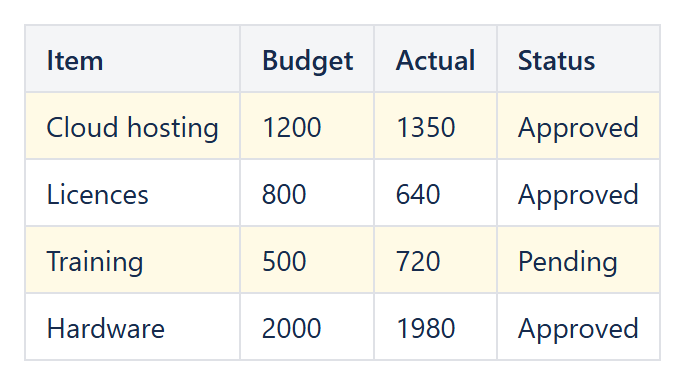
Example: actual over budget
With Applies to pointing at the row (for example A:D, so the whole row is checked and formatted) and a budget column B and an actual-spend column C:
Value 1:$C1 > $B1
The $ before the column letters keeps the column fixed while the row follows the row being checked, exactly like a mixed reference in a spreadsheet, so every cell of the row compares the same two columns and the whole row is formatted. Without the $ the columns would shift for every cell of the row, the same way a spreadsheet formula shifts when it is copied sideways – there is no need to write a separate rule per row.
Example: delivered less than ordered
Value 1:$D1 < $C1
Combining several columns
Because the formula is a normal CelesteCS Math expression, it can combine as many cells and functions as the check needs: Value 1: AND($C1 > $B1, $D1 = "Approved") only highlights rows that are both over budget and already approved, using the same AND/OR/NOT logical functions available anywhere else in the plug-in.
Referencing a fixed cell instead of the row
Prefix a reference with $ to keep it fixed while the rest of the formula walks down the rows, exactly like an absolute reference in a spreadsheet – $C1 > $B$2 compares every row’s column C against the single value in B2, useful for comparing a whole column against one shared threshold cell that a reader can edit without touching the rule itself.
Try it in your own Confluence: CelesteCS Conditions for Confluence on the Atlassian Marketplace – free trial for Cloud and Data Center.
Conditions saves you time? A review on the Marketplace helps other teams find it.