CelesteCS Math’s Numerical Expression macro has always been able to read table data and calculate over it, but sometimes a number is not what you want – a trend, a comparison, or a proportion is easier to read as a picture. The new Chart macro renders a Bar, Line or Pie chart directly from a range of cells, recalculated fresh on every page view exactly like a Numerical Expression formula – there is no image to re-upload and no external charting service involved.
Parameters
- Data range (required) – the range of cells to plot, in the same Excel-like notation as every other Math range, e.g.
Table1.B2:B6. - Labels range – an optional parallel range used as category names (Bar/Pie) or point labels (Line). Left empty, points are labeled with plain numeric indices.
- Chart type – Bar, Line or Pie.
- Title – an optional title shown above the chart.
- Color – a hex code (
#4C72B0by default) or a CSS color keyword for the chart’s fill/line color.
Example: a quarterly sales bar chart
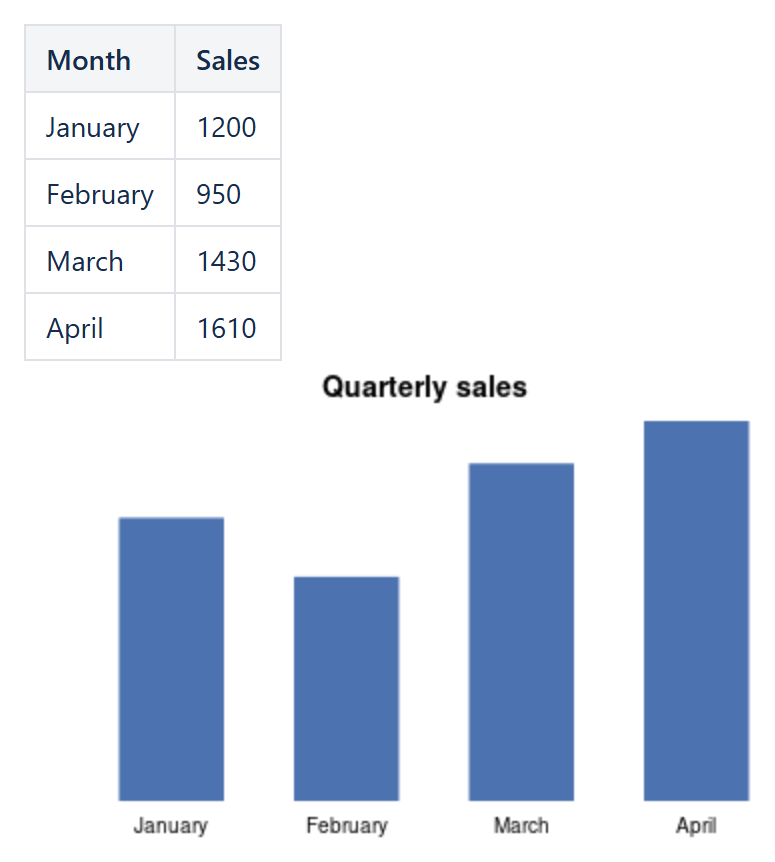
Given a table with a month column and a sales column:
Data range:Table1.B2:B5Labels range:Table1.A2:A5Chart type:BarTitle:Quarterly sales
The result is a self-contained chart with one bar per month, labeled from the month column, that redraws itself the next time anyone views the page after the source numbers change – useful for a status page fed by a table that a team keeps updating, without anyone touching the chart itself.
Reading data from another page
Just like a Numerical Expression formula, the range does not have to live on the same page: point it at a table on another wiki page the same way you would reference table values as Numerical Expression operands, and the chart will follow that table’s current data.
A word of caution
Because Chart resolves its range the same way a formula does, the same rule applies as to any other macro that can read “the whole page”: don’t put the chart inside the very range it reads from. See our article on avoiding self-referencing macro loops for the details and why it matters.
Chart is available on both Confluence Server/Data Center and Confluence Cloud with the same parameters.
Try it in your own Confluence: CelesteCS Math for Confluence on the Atlassian Marketplace – free trial for Cloud and Data Center.
Math saves you time? A review on the Marketplace helps other teams find it.