Date data type support is the one of the most valuable features of CelesteCS Math. With date and time functions one can create pages with information on project dates or show the amount of days till specific date.
On Confluence Cloud: insert this as CelesteCS Numerical Expression Cloud (Insert → Other macros) – the formula syntax below is identical on Cloud and Data Center.
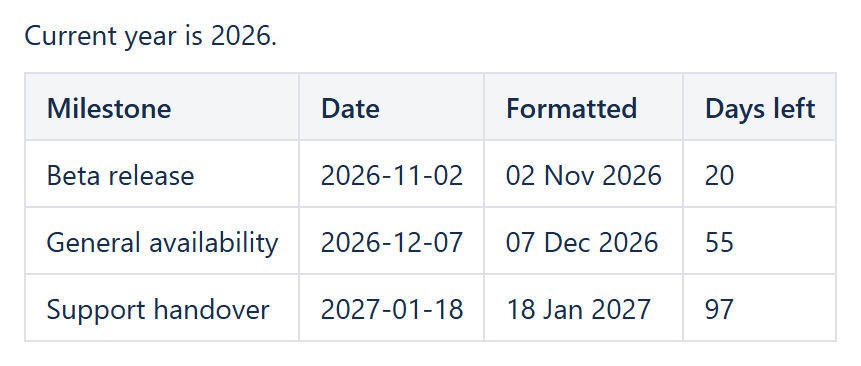
The following article will show the common scenarios and date-time function usage examples.
Retrieving specific datetime values
If year, month and day of month are known, the datetime for these values may be retrieved by DATE function, for example:
DATE(2017, 02, 14)
The other way for retrieving specific date is by parsing text value, which may be taken from the Calendar control or any other source. Parsing text into datetime value is performed by DATEVALUE function, for example:
TEXT(DATEVALUE("2016-02-14"),"MM/DD/YY")
Current date and time may be retrieved by NOW function. It is usually used in a conjunction with other date and time functions, for example:
Current year is { YEAR(NOW()) }.
Formatting date and time
Use TEXT function for formatting dates. This function may format currencies, percentages and a lot of other things, but it is most valuable for date and time formatting. The following example shows formatting from one date format into another one:
TEXT(DATEVALUE("2016-02-14"),"MM/DD/YY")
TEXT function supports formatting of both date-only and date-and-time values. It supports a set of commonly used datetime templates, such as:
- "yyyy-MM-dd HH:mm:ss",
- "yyyy-MM-dd HH:mm",
- "dd-MM-yyyy HH:mm a",
- "dd/MMM/yyyy HH:mm:ss Z",
- "dd/MMM/yyyy HH:mm",
- "yyyy-MM-dd",
- "//dd/MM/yyyy",
- "dd MMM yyyy",
- "dd/MMM/yy",
- "yyyy-MM-dd"
Additionally it supports commonly used templates for US and GERMAN locales. If any additional template is needed, feel free to contact
Complex examples
TEXT function may be used for parsing table cell values to be referenced in Math formulas. Here is an example of how to reference cell value and convert it to datetime value:
TEXT(DATEVALUE(Table1.A2),"MM/DD/YYYY")
A frequent example of working with dates is showing the number of days till the release date. DAYS function is used for such calculations. Here is how to accomplish it:
DAYS(DATEVALUE(Table1.A2), NOW())
See also
The full list of date and time functions, including newer additions like EDATE and EOMONTH for shifting a date by whole months, is in the Functions reference. If what you want to do with a date is highlight a row rather than calculate with it – flag anything overdue, due soon, or from today – CelesteCS Conditions now has dedicated date conditions for that, see Highlighting top performers, overdue dates and duplicates.
Try it in your own Confluence: CelesteCS Math for Confluence on the Atlassian Marketplace – free trial for Cloud and Data Center.
Math saves you time? A review on the Marketplace helps other teams find it.