Summing a whole column is one thing; a genuinely common request goes a step further – a column whose value depends on other columns in the same row, such as a total price computed from a unit price and a tax rate. Plain Confluence tables have no concept of a per-row formula at all, so this is normally done by hand and re-typed every time a source number changes.
On Confluence Cloud: the Numerical Expression macro is called CelesteCS Numerical Expression Cloud, and CelesteCS Reporting for Confluence Cloud uses the same Reporting Table Item formula syntax shown below – both approaches work the same way as on Data Center.
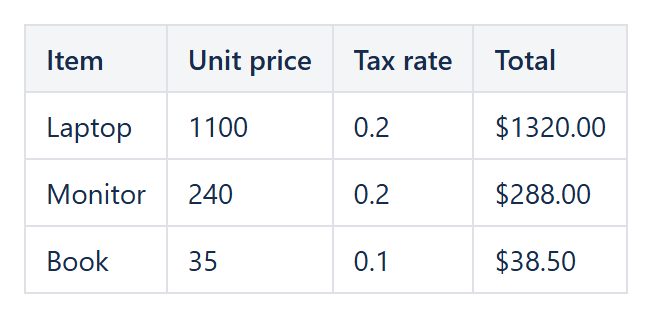
One macro per row
The most direct approach is a small Numerical Expression macro in the result column of each row, referencing that row’s own cells:
- Row 2:
Table1.B2 * (1 + Table1.C2) - Row 3:
Table1.B3 * (1 + Table1.C3)
with B holding the unit price and C the tax rate as a decimal (e.g. 0.2 for 20%). Each macro is independent, so rows can be added, removed or reordered without renumbering anything else – every macro only ever looks at its own row.
Formatting the result
Wrap the formula in FORMAT or TEXT to show it as currency instead of a bare number, for example TEXT(Table1.B2 * (1 + Table1.C2), "$0.00"), which turns 132 into $132.00.
When there are many rows
Placing one macro per row works well for a handful of rows, but does not scale to a table with fifty of them. At that point it is worth building the table with CelesteCS Reporting instead: a single Reporting Table Item formula such as CurrentItem.unitPrice * (1 + CurrentItem.taxRate) is evaluated once per row automatically for however many rows the data provider returns, with no per-row macro copy-pasting at all – see our article on going beyond the Jira Issues macro for the same idea applied to Jira data.
Try it in your own Confluence: CelesteCS Reporting for Confluence on the Atlassian Marketplace – free trial for Cloud and Data Center. This example also uses CelesteCS Math for Confluence.
Math saves you time? A review on the Marketplace helps other teams find it.