A previous article showed how to pull Jira issue field values onto a Confluence page with JIRAISSUEFIELDVALUES and combine them with basic functions like SUM, AVERAGE and COUNT. This article goes one step further and builds an actual sprint/epic progress dashboard, using several of the newer statistical and lookup functions that were added to CelesteCS Math to make this kind of reporting easier without leaving the formula bar.
The building blocks
- JIRAISSUEFIELDVALUES(jql_request, field_name, value_if_null, [app_link_name]) – returns the specified field of every issue matching a JQL query, as an array you can feed to any other function.
- RANK(number, ref, [order]) – ranks a value within a range: who is #1 by story points closed, #2, and so on.
order = 0(the default) ranks the largest value first; any non-zero order ranks ascending. - STDEV / VAR – the sample standard deviation and variance of a set of values, useful for spotting whether estimation accuracy across a team is consistent or wildly uneven.
- MAXIFS / MINIFS(range, criteria_range1, criteria1, ...) – the highest or lowest value in a range, filtered by one or more conditions, without writing a separate JQL query per condition.
- INDEX(array, row_num, [column_num]) and MATCH(lookup_value, lookup_array, [match_type]) – the classic Excel pair for “find this value’s position, then read the corresponding value from a parallel array”, which is exactly the shape Jira field arrays come in.
Example: who is carrying the most open story points?
Assume a table with assignee names in column A, and this formula in the adjoining cell to fetch how many open story points each is holding:
SUMIF(JIRAISSUEFIELDVALUES('project = APP and assignee = "John Doe" and resolution = Unresolved', 'Assignee', '', 'Company Jira'), ">=0", JIRAISSUEFIELDVALUES('project = APP and assignee = "John Doe" and resolution = Unresolved', 'Story Points', 0, 'Company Jira'))
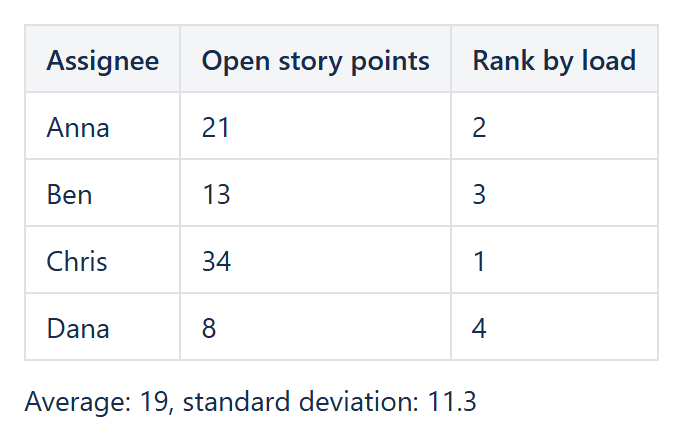
Simpler still, once you already have one column per assignee with their open story-point totals, ranking who is most loaded is one formula:
RANK(Table1.B2, Table1.B2:B9)in every row of column C gives each assignee’s rank by workload, largest first – no manual sorting, and it updates itself every time the page is viewed.
Example: is this sprint’s estimation consistent?
With a column of estimate-vs-actual ratios for closed issues in a sprint, STDEV(Table1.C2:C25) next to AVERAGE(Table1.C2:C25) gives you both the typical ratio and how much it varies – a low average close to 1 with a high standard deviation is a team that is right on average but wildly inconsistent issue to issue, which is a very different problem from a team that is consistently over- or under-estimating.
Example: look up a teammate’s current epic by name
If column A holds assignee names and column B holds their current epic (both pulled with JIRAISSUEFIELDVALUES), INDEX(Table1.B1:B20, MATCH("Jane Smith", Table1.A1:A20, 0)) reads off Jane’s epic without a lookup table or a second JQL query, and works the same way for any other single-value lookup across two parallel arrays.
The full list of functions, with exact parameter order and examples, is in the Functions reference. All of the functions above work identically on Confluence Data Center and Confluence Cloud.
Try it in your own Confluence: CelesteCS Math for Confluence on the Atlassian Marketplace – free trial for Cloud and Data Center.
Math saves you time? A review on the Marketplace helps other teams find it.