Jira can give the time from Created to Resolved, but not that time minus the days a bug was parked On hold. CelesteCS Reporting for Confluence has a formula function for it, TIMEINSTATUS, which adds up how long a work item has been in the statuses you name, all visits together, the current one up to now.
The trick: count the statuses that make up the age, and leave out On hold and Done. Time after closing is then not counted either, and a reopened bug picks up where it stopped.
Checked on Confluence Cloud with Jira Cloud. Data Center: Reporting 15.3.0 or later.
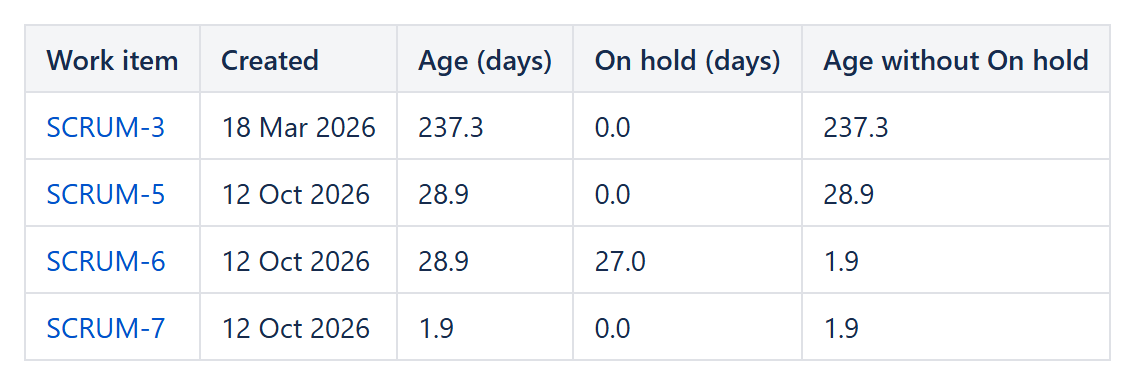
Our test project has no On hold status, so in this screenshot In Progress plays its part: SCRUM-6 has been 27 of its 28.9 days in it, so its age without it is 1.9 days. SCRUM-7 was closed after 1.9 days and its age stays there.
Settings
- Jira Data Provider, Query:
issuetype = Bug(plus your project), Fields:summary,created - Table View columns:
- Age (days):
TIMEINSTATUS(CurrentItem; "Open, In Progress, In Review, On hold") - On hold (days):
TIMEINSTATUS(CurrentItem; "On hold") - Age without On hold:
TIMEINSTATUS(CurrentItem; "Open, In Progress, In Review")
- Age (days):
Use your own workflow's status names, separated by commas. A third argument changes the unit: "h" hours, "w" weeks (days by default). Names are not case-sensitive, and a status that was renamed later still counts.
Good to know
- Average bug age: set the footer aggregate of the column to Average.
- Only bugs older than 30 days: Filter
TIMEINSTATUS(CurrentItem; "Open, In Progress, In Review") > 30on the provider. - The time is calendar time, weekends included.
- Reporting reads the status history only for reports that use this function, so other reports are not slowed down.
Try it in your own Confluence: CelesteCS Reporting for Confluence on the Atlassian Marketplace – free trial for Cloud and Data Center.
Reporting saves you time? A review on the Marketplace – Reporting – helps other teams find it.