A recurring question about plain Confluence tables is simple: there is no built-in way to sum a column and show the total anywhere on the page. Confluence itself has no formula row, and copying the total in by hand means it is wrong the moment someone edits a number. A single Numerical Expression macro solves this without changing the table at all.
On Confluence Cloud: insert this as CelesteCS Numerical Expression Cloud (Insert → Other macros) – the formula syntax below is identical on Cloud and Data Center.
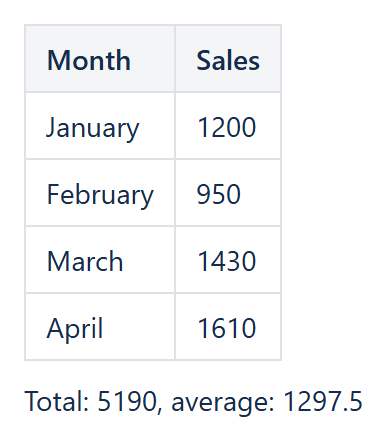
The basic total
Add a Numerical Expression macro anywhere on the page (below the table, in a text line, wherever the total should show up) and enter a formula referencing the column:
SUM(Table1.B2:B10)
The range is the same Excel-style notation used everywhere in CelesteCS Math: Table1 is the first table on the page (or inside the macro, or on another page – see Outer values source), and B2:B10 covers the rows with data, skipping the header row.
Making it read naturally
Set Macro body content to Text and expressions in curly braces and write the total as a sentence instead of a bare number:
Total: { SUM(Table1.B2:B10) }
More than a sum
The same pattern works for any other aggregate: AVERAGE(Table1.B2:B10) for a mean, MAX/MIN for the extremes, or COUNT(Table1.B2:B10) for how many numeric rows there are. Combine several in one macro body:
Total: { SUM(Table1.B2:B10) }, average: { ROUND(AVERAGE(Table1.B2:B10), 2) }
Because the macro reads the table live on every page view, the total, average or count is always in sync with whatever is currently in the table – add a row, delete a row, change a number, and the summary line updates itself the next time the page is viewed. No plugin-specific table format is required: any ordinary Confluence table works as the data source.
Try it in your own Confluence: CelesteCS Math for Confluence on the Atlassian Marketplace – free trial for Cloud and Data Center.
Math saves you time? A review on the Marketplace helps other teams find it.