Knowledge-base reviews, archiving projects and content audits all start with the same list: every page, who created it, who touched it last, and how long ago. Confluence has the data, but the CSV space export is a technical backup format and the admin space reports need admin rights. With CelesteCS Reporting for Confluence the list is an ordinary Confluence table, built live from a CQL search with the permissions of the person viewing it.
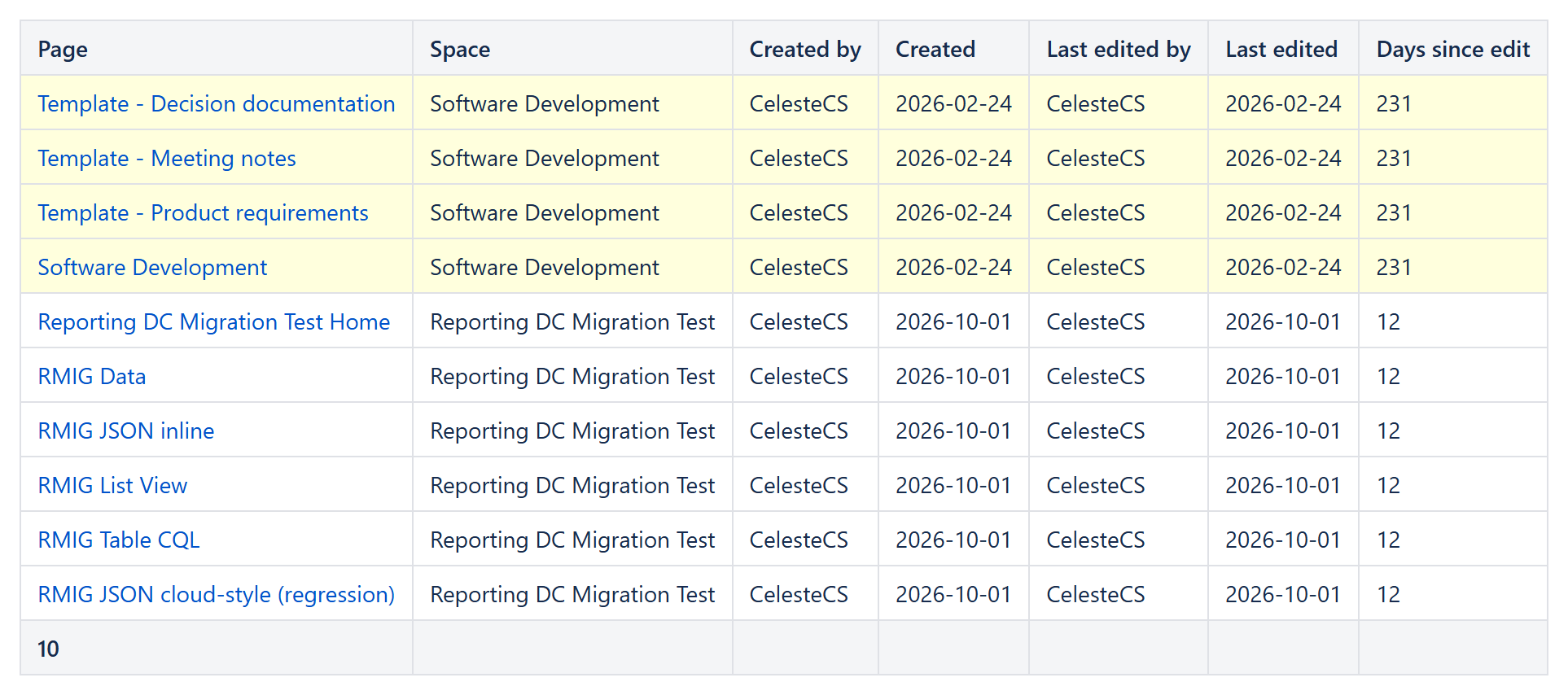
1. The configuration
Insert a Reporting Table View macro and put a Reporting Confluence Data Provider inside it:
Query:space = KB and type = page(any CQL: several spaces withspace in (KB, HR), one section withancestor = 12345, a label withlabel = "how-to")Expand:history,history.lastUpdated,space
Then add one Reporting Table Item per column:
| Column | Body content |
|---|---|
| Page | <a href="https://your-site.atlassian.net/wiki[CurrentItem._links.webui]">[CurrentItem.title]</a> – Body content type Text and expressions in square braces, Body output type HTML, Footer aggregate Count |
| Space | CurrentItem.space.name |
| Created by | CurrentItem.history.createdBy.displayName |
| Created | LEFT(CurrentItem.history.createdDate; 10) |
| Last edited by | CurrentItem.history.lastUpdated.by.displayName |
| Last edited | LEFT(CurrentItem.history.lastUpdated.when; 10) |
| Days since edit | DAYS(TODAY(); DATEVALUE(LEFT(CurrentItem.history.lastUpdated.when; 10))) with Highlight when DAYS(TODAY(); DATEVALUE(LEFT(CurrentItem.history.lastUpdated.when; 10))) > 180 |
Add ORDER BY lastmodified ASC to the query to list the stalest pages first. The footer Count gives the number of pages, so one table per space answers “how many pages do we have here”.
2. Using it
- Review queue for page owners. Filter to one author with the data provider’s Filter, e.g.
CurrentItem.history.createdBy.displayName = "Jane Smith", and the highlighted rows are that person’s articles due for review. Because the page is live, a row stops being highlighted as soon as the article is edited. - Into Excel. Select the table on the page and paste it into Excel: columns and links are kept, so no export file is needed.
- No admin rights needed. The search runs as the person viewing the page, so it lists exactly the pages that person can see.
Limits to know
- One table returns up to 1,000 pages; for larger spaces split the query (by space, section or label).
- CQL returns current pages; archived and deleted pages are not listed.
- The parent page and page restrictions are not available as columns; use
ancestor = <page ID>to report on one section of the tree. - On Confluence Data Center the people fields work, but the two date fields from history come back empty (a gap in the underlying search service, see the data provider documentation), so the age columns are Cloud-only for now.
Related: Reporting on what Confluence Analytics can’t show you: page creators and last editors.
Try it in your own Confluence: CelesteCS Reporting for Confluence on the Atlassian Marketplace – free trial for Cloud and Data Center.
Reporting saves you time? A review on the Marketplace helps other teams find it.