Confluence Databases and plain tables are fine for lists, but finance, procurement and operations reports usually need more: values calculated per row, totals underneath, risky rows highlighted, data that comes from an export of another system. CelesteCS Reporting for Confluence builds such a table on a page from JSON data and recalculates it on every page view.
Works on Confluence Cloud and Data Center.
1. The data
Insert a Reporting Table View with a Reporting Json Data Provider inside. The provider reads a JSON array either from a .json attachment (Json data attachment file name, optionally on another page) or pasted directly into the macro. Nested fields are fine: they are addressed with dots, for example CurrentItem.contract.unitPrice, and Json data root points at the array inside an API response such as {"results": [...]}.
Example rows:
[
  {"region": "EMEA", "businessUnit": "Operations", "vendor": "Globex",
   "unitPrice": 80, "quantity": 200, "forecast": 15000, "actual": 16000, "breachPct": 0.07},
  ...
]
2. Calculated columns, totals and highlighting
| Header | Body content | Options |
|---|---|---|
| Region / Business unit / Vendor | CurrentItem.region | (one column each) |
| Contract value | CurrentItem.unitPrice * CurrentItem.quantity | Format type: Currency, Format currency symbol: $, Format decimals: 0, Footer aggregate: Sum |
| Forecast variance | CurrentItem.forecast - CurrentItem.actual | Format type: Number, Format decimals: 0, Footer aggregate: Sum |
| SLA breach | CurrentItem.breachPct | Format type: Percent, Format decimals: 1, Footer aggregate: Average |
| SLA risk | IF(CurrentItem.breachPct > 0.05; "High"; IF(CurrentItem.breachPct > 0.02; "Medium"; "Low")) | Highlight when: CurrentItem.breachPct > 0.05 |
Set Sort on the Table View to region,businessUnit,vendor to keep regions and business units together.
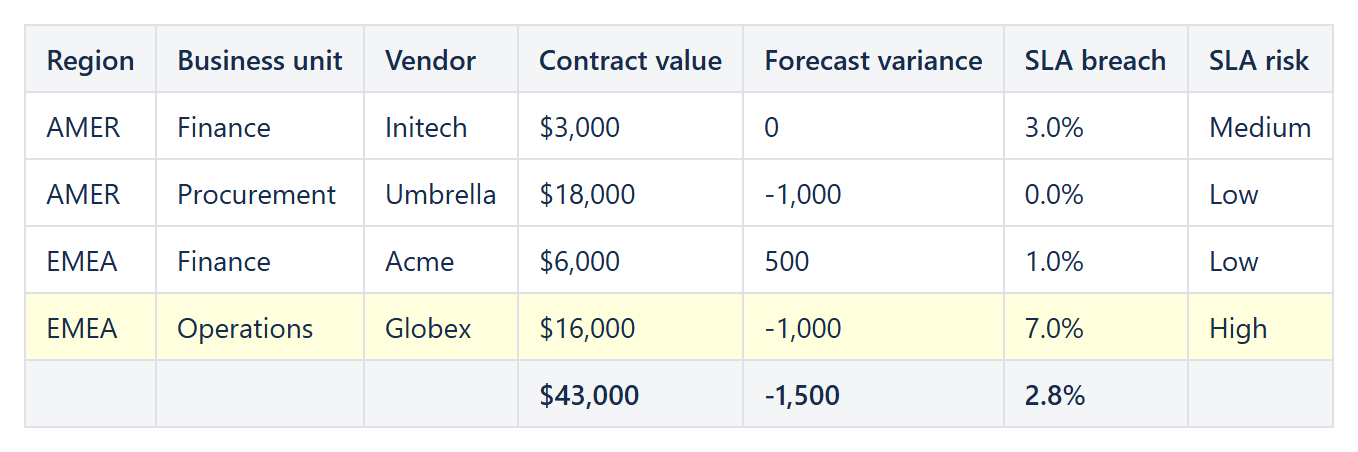
Result
| Region | Business unit | Vendor | Contract value | Forecast variance | SLA breach | SLA risk |
|---|---|---|---|---|---|---|
| AMER | Finance | Initech | $3,000 | 0 | 3.0% | Medium |
| AMER | Procurement | Umbrella | $18,000 | -1,000 | 0.0% | Low |
| EMEA | Finance | Acme | $6,000 | 500 | 1.0% | Low |
| EMEA | Operations | Globex | $16,000 | -1,000 | 7.0% | High |
| $43,000 | -1,500 | 2.8% |
Good to know
- The report reads JSON (or a text file with JSON). Excel data has to be saved as JSON first; for a table that already lives on the page as a normal Confluence table, CelesteCS Math adds calculated cells and totals to it directly.
- Totals are for the whole table (Sum, Average, Count, Min or Max per column). Nested grouping with a subtotal per group is not built in; one Table View per group, each with its own Filter such as
CurrentItem.region = "EMEA", gives the same result. - To color cells by value (green / amber / red) instead of highlighting rows, wrap the table in CelesteCS Conditions rules.
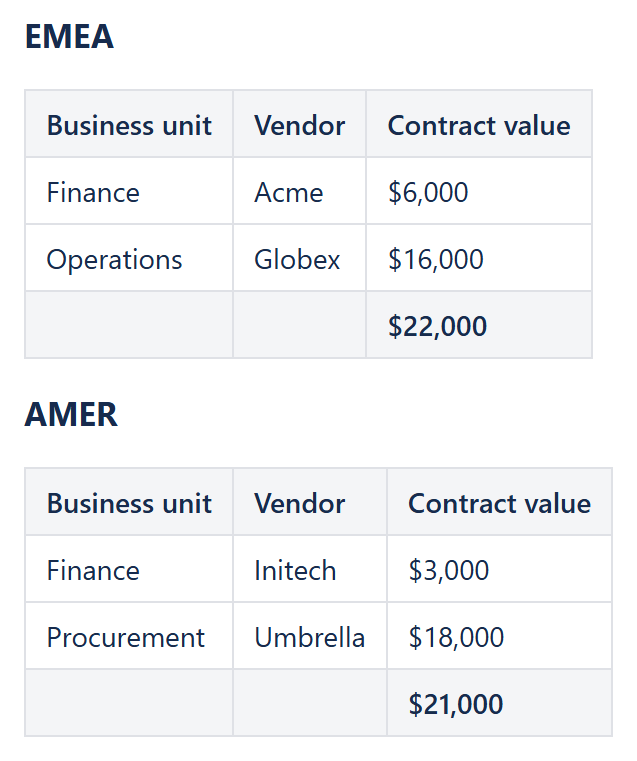
Example: one Table View per region with its own Filter and footer total.
Try it in your own Confluence: CelesteCS Reporting for Confluence on the Atlassian Marketplace – free trial for Cloud and Data Center.
Math, Conditions or Reporting saves you time? A review on the Marketplace – Math, Conditions, Reporting – helps other teams find them.